
Best AI Chatbots for Small Business: How to Pick the Right One in 2026
If you run a small business, the short answer is this: the best AI chatbots for small businesses right now are the ones that answer customer questions instantly, cost under $100 a month to start, and set up without a developer. That short list usually includes tools built for customer service first, sales second, and everything else as a bonus.
Small business owners don’t have time to test ten platforms. You want something that plugs into your website or WhatsApp, learns your business fast, and starts saving you hours in the first week. This guide breaks down what actually matters, ranks the strongest options, shows real 2026 pricing instead of marketing copy, and walks through how to match a chatbot to your budget and team size.
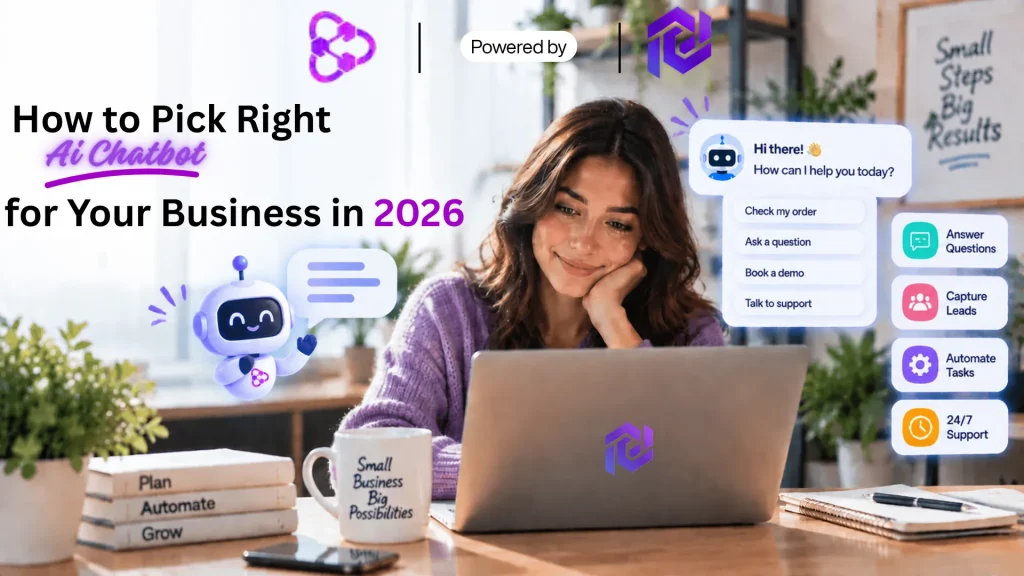
What Makes a Good AI Chatbot for a Small Business
Not every AI chatbot for small business option is built the same way, and picking the wrong one for your team size can waste months of setup time. Enterprise tools pack in features you’ll never touch and charge for the privilege. Bare-bones scripted bots, on the other hand, frustrate customers the moment a question falls outside their script. What a lean team actually needs sits in the middle of those two extremes, and it looks different depending on how your customers reach you and how repetitive your support load actually is.
Here’s what to check before you commit to anything:
- Fast setup. You should be live in a day, not a month. Look for tools that train on your existing FAQs, website content, or product catalog automatically instead of requiring you to write every conversation flow by hand.
- Human handoff. Even the best bot hits a question it can’t answer. It needs to route that chat to a real person without the customer repeating themselves, ideally with the full conversation history attached so the handoff feels seamless rather than jarring.
- Channel coverage. Your customers message you on your website, WhatsApp, Instagram, and email. A good chatbot for customer service should cover the channels you already use, not force new ones on you or fragment your support across separate inboxes.
- Clear pricing. Small teams need predictable costs. Usage-based pricing that spikes during your busiest month is a real risk, and it’s worth knowing exactly what metric drives your bill — conversations, messages, or active users — before you sign up.
- Reporting you’ll actually read. Simple dashboards showing resolved chats, missed questions, and lead volume matter more than a wall of analytics nobody on a five-person team has time to dig through.
- Real knowledge grounding. A chatbot that actually reads your help docs and product pages, rather than guessing from a short FAQ list, gives noticeably more accurate answers and needs far less manual correction over time.
Industry data backs up why this matters now. Adoption among small businesses has climbed sharply in the past two years, with recent survey data putting regular AI use at roughly two-thirds of U.S. small businesses, up from around a third in 2023. A Gartner survey published in early 2026 found that 91% of customer service leaders now feel pressure from company leadership to roll out AI this year, with the goal shifting from pure cost-cutting toward genuinely improving customer satisfaction.
That shift matters for small businesses too, because it means vendors are investing more in accuracy, integrations, and clean human handoffs — not just raw chat volume — which is exactly what separates a good chatbot from a frustrating one. Cost has also stopped being the barrier it once was: AI chatbot for small business options now start well under $100 a month, a shift covered in more depth in this breakdown of real AI chatbot pricing for 2026.
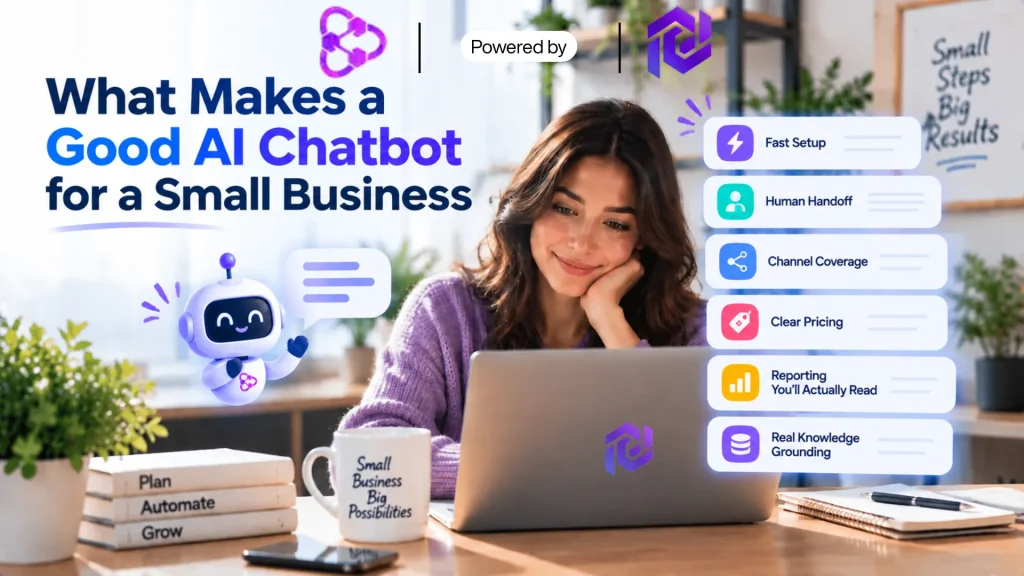
Best AI Chatbots for Small Business in 2026
Here’s a ranked look at the strongest options for small teams, based on ease of setup, pricing, and how well each one handles customer service without heavy configuration. None of these need a developer to get running, and all of them offer either a free tier or a short trial, so testing one against your actual FAQ list costs you nothing but a little time.
1. UChatbots
UChatbots uses a visual workflow builder combined with knowledge-base ingestion, so replies are grounded in your actual site content rather than a short scripted FAQ. As a chatbot for customer service, it also builds in AEO (answer engine optimization), which is meant to help your business show up correctly when customers ask AI assistants like ChatGPT or Gemini about you.
Pricing runs pay-as-you-use: a free plan with 1,000 conversations a month and $2.50 in bundled AI spend, a $26/month Pro tier with access to GPT-4, Claude, and Gemini in one workspace, and an $89/month Team tier supporting up to 10 bots and 10,000 conversations. That structure keeps light users from overpaying, though heavier volume will push you into the Team tier faster than the sticker price suggests.
2. Intercom Fin
Intercom Fin separates the platform seat from the AI itself. Seats run $39/month (Essential, $29 on annual billing) up to $139/month (Expert) per agent, and the Fin AI agent bills on top at $0.99 per resolved conversation, charged once regardless of how many messages it takes to get there.
For a five-agent team, that’s roughly $145–$700+ a month before Fin resolves a single ticket, so it’s worth modeling your real ticket volume before committing. Reporting on resolution rates and CSAT is genuinely strong, and human handoff is clean, but this is priced for a business that already has support volume worth optimizing, not a solo owner just getting started.
3. Tidio
Tidio splits live chat from its AI layer, which catches a lot of buyers off guard. As one of the more affordable AI chatbot entry points on this list, the free plan covers 50 conversations a month with Tidio branding, Starter runs about $29/month for live chat alone, and Growth is around $59/month with branding removed and more automation. The Lyro AI response bot is priced separately, roughly $32.50/month as an add-on.
Hence, a fully AI-powered setup on Tidio typically lands closer to $90–$120/month all-in rather than the advertised entry price. It integrates directly with Shopify and WooCommerce product data, which makes setup fast for stores whose questions are mostly about orders, shipping, and returns.
4. Freshchat
Freshchat’s free plan covers up to 10 agents with web chat, email, and a unified inbox, which is generous for a very small team. Growth runs about $19/agent/month and includes 500 free Freddy AI sessions; Pro is around $49/agent/month with advanced automation and dashboards; and Enterprise runs about $79/agent/month.
Extra Freddy AI sessions beyond the free allowance are metered separately, so volume matters here too. It shares an admin panel with other Freshworks products, which is a real advantage if you’re already on Freshdesk or Freshsales, but a non-factor if you’re not.
5. Zendesk AI
Zendesk bundles AI agents into every Suite plan now rather than selling them as a separate add-on. Still, the real cost shows up in three layers: the seat (Suite Team around $55/agent/month, Suite Professional around $115), the Copilot add-on for full AI features (about $50/agent/month), and a per-resolution meter once you exceed a small monthly allowance, commonly reported around $1.50 per resolution on a committed plan or $2.00 pay-as-you-go.
That structure rewards teams with predictable, budgeted volume and penalizes teams that don’t track it. It’s a strong fit if you’re already running Zendesk for ticketing and want AI layered on top rather than a separate tool to manage.
6. Chatfuel
Chatfuel’s 2026 lineup leads with a free “Light” plan covering Instagram, Facebook, and WhatsApp automation with a shared inbox, and a single AI Pro tier at about $49/month that unlocks AI-driven sales and support conversations.
It bills by conversation volume rather than contact count, which works in your favor if you have a large follower list but only a fraction of them actually messaging you each month. It’s a strong fit for small businesses whose leads come mostly through Instagram or Facebook DMs rather than a website contact form.
7. ManyChat
ManyChat prices by contact count instead of conversations: free for 25 active contacts, then roughly $14/month for 250 contacts, $29/month for 2,500 (its most popular tier, with AI-powered replies unlocked), $69/month for 7,500, and $139/month for 25,000, with per-contact charges climbing from there.
That model gets expensive fast if you run broad audience campaigns where most contacts only message once. Still, it covers more channels than most competitors — Instagram, Messenger, WhatsApp, Tiktok, Telegram, SMS, and email. It’s built more for marketing-driven lead capture than day-to-day customer service, so pair it with a dedicated support tool if ticket volume is your bigger problem.
Chatbot Pricing Plans: What You'll Actually Pay
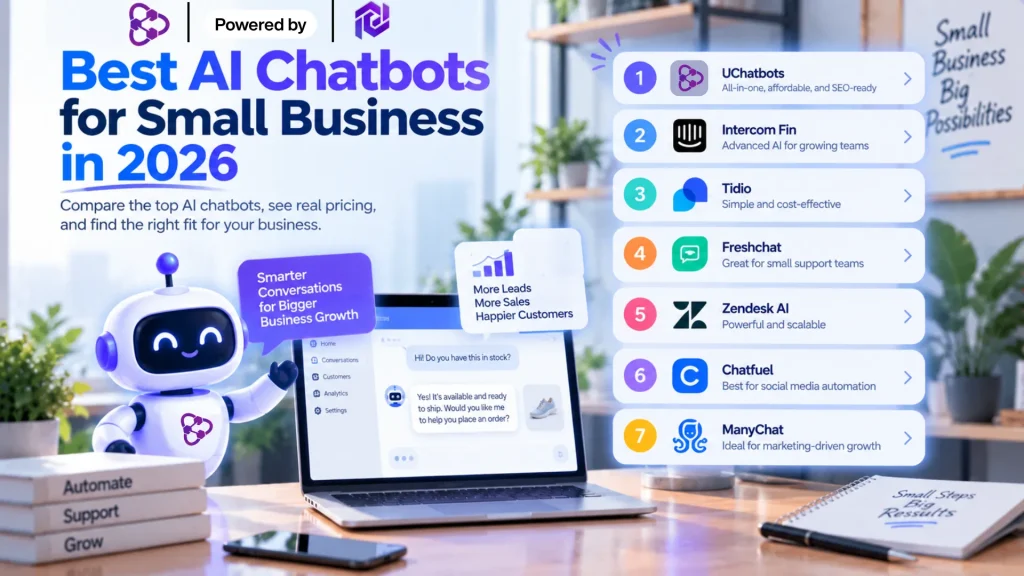
Picking an AI chatbot for small business use often comes down to price before anything else, and chatbot pricing plans vary more than most software categories, mostly because vendors price by conversation volume, seats, or features unlocked rather than a flat per-user fee. Here’s roughly what to expect across the market in 2026:
- Free or under $30/month: Basic scripted bots, limited AI responses, capped conversation volume (often 50–1,000 a month), and vendor branding on the widget. Fine for testing, not for real support load.
- $30–$100/month: Most affordable AI chatbot options for small business live here. Expect real generative AI responses, a synced knowledge base, one or two channel integrations, and human handoff. Data from a detailed 2026 pricing breakdown suggests a chatbot in this range can reasonably handle 70–80% of routine questions if your monthly volume stays under roughly 2,000–3,000 conversations.
- $100–$500/month: Multi-channel coverage, better reporting, CRM sync, and priority support. This is where tools like Intercom Fin and Zendesk AI typically sit once you add seats and connect a helpdesk.
- $500+/month: Enterprise-grade volume, custom integrations, SOC2/HIPAA-level compliance, and dedicated account support. Most small businesses don’t need this tier yet, and paying for it early usually buys unused headroom.
Two billing details are worth checking before you sign anything. First, ask whether the plan bills by conversation, by message/token, or by monthly active users — that single detail decides how predictable your bill is. Second, if a chatbot pricing plan charges by conversation and your traffic is seasonal, ask for a rollover allowance or an overage cap before you commit.
Surprise bills during your busiest sales month defeat the purpose of switching to AI in the first place. For a full walkthrough of billing models, hidden implementation costs, and a side-by-side of free versus paid tiers, this complete AI chatbot pricing guide for 2026 goes deeper than most vendor pricing pages ever will.
AI Chatbots for Customer Service vs Sales and Marketing
Not every chatbot for small business is built for the same job, and mixing this up is one of the most common mistakes small teams make when they buy their first one.
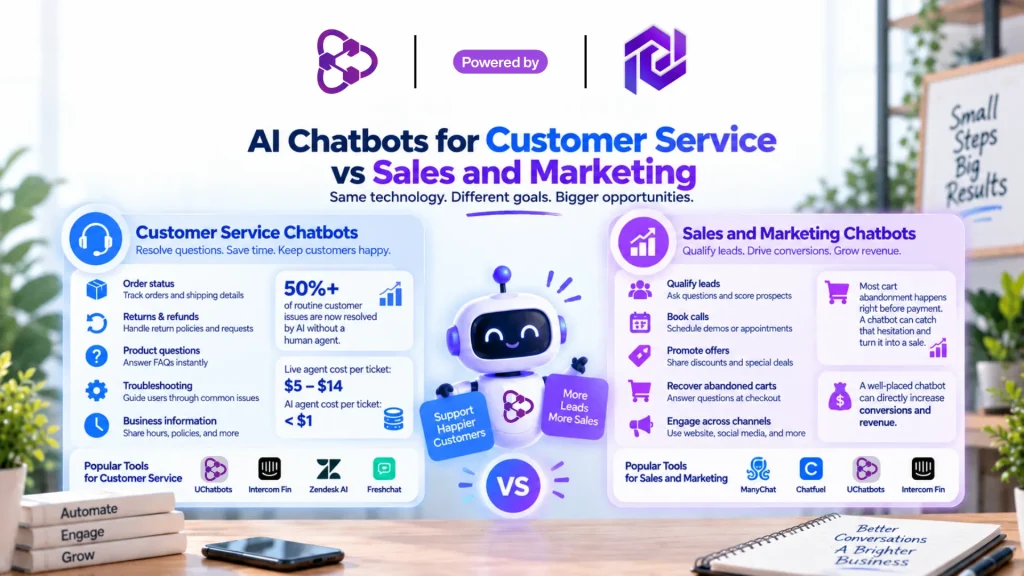
- Customer service chatbots focus on resolving questions fast: order status, returns, hours, troubleshooting. Self-service bots now resolve well over half of routine customer issues without a human touching the conversation, and simple FAQ-style queries see even higher resolution rates. A separate look at measuring AI customer support ROI puts real numbers on this: a live agent typically costs $5–$14 to resolve a single ticket. In contrast, an AI agent can often resolve the same request for under $1, and most businesses see their AI investment pay for itself within 6 to 18 months depending on ticket volume. If reducing support tickets is your goal, prioritize a chatbot for customer service first, and track cost-per-resolution rather than just conversation counts so you can actually prove the tool is working.
- Sales and marketing chatbots exist to qualify leads, book calls, or push a promo at the right moment. ManyChat and Chatfuel lean this way. There’s a real revenue case here too — research on real-time agent assist points out that most cart abandonment happens right before payment, when a small unanswered doubt about shipping or returns causes a visitor to leave. A chatbot placed on the checkout page, not just the homepage, can catch that hesitation before it turns into a lost sale. Still, these tools are less useful if your real pain point is an overloaded support inbox rather than leads that go cold.
Some tools, like UChatbots and Intercom Fin, blend both reasonably well. If you only have budget for one platform, pick based on where you’re losing the most time or money today, not the flashiest demo.
How to Choose the Right Chatbot for Your Business
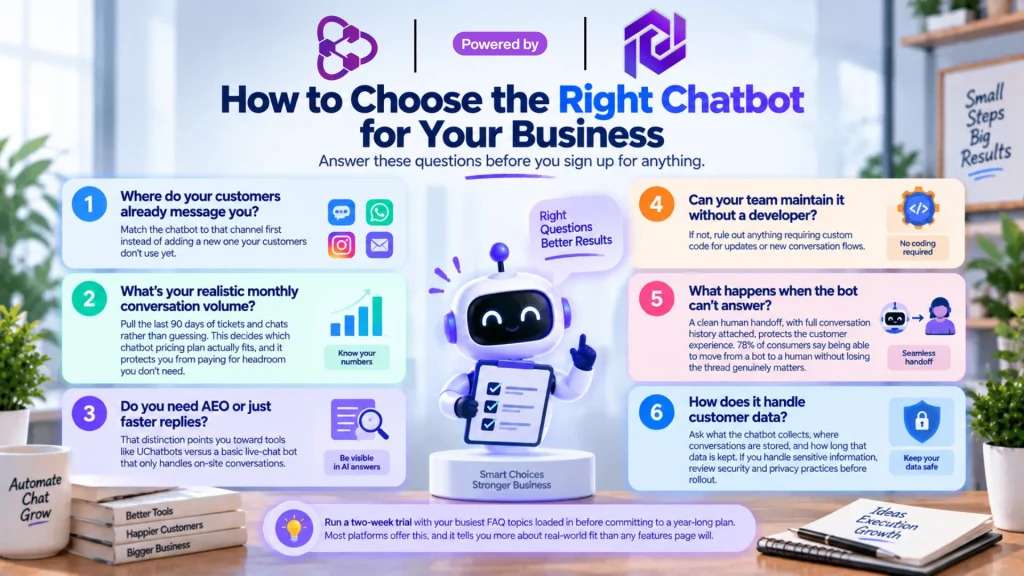
Work through these questions before you sign up for anything:
- Where do your customers already message you? Match the chatbot to that channel first instead of adding a new one your customers don’t use yet.
- What’s your realistic monthly conversation volume? Pull the last 90 days of tickets and chats rather than guessing. This decides which chatbot pricing plan actually fits, and it protects you from paying for headroom you don’t need.
- Do you need AEO or AI-answer visibility, or just faster replies? That distinction points you toward tools like UChatbots versus a basic live-chat bot that only handles on-site conversations.
- Can your team maintain it without a developer? If not, rule out anything requiring custom code for updates or new conversation flows.
- What happens when the bot can’t answer? A clean human handoff, with full conversation history attached, protects the customer experience. A detailed look at how chatbots and human agents work together found that 78% of consumers say being able to move from a bot to a human without losing the thread of the conversation genuinely matters to them — yet only a minority of businesses actually deliver that smoothly. Test this specific moment before you buy, not after.
- How does it handle customer data? Ask what the chatbot collects, where conversations are stored, and how long that data is kept before you connect it to anything sensitive. If your business handles account details, payments, or health information through chat, it’s worth reviewing basic chatbot security and privacy practices before rollout, not after a customer asks where their data went.
Run a two-week trial with your busiest FAQ topics loaded in before committing to a year-long plan. Most platforms offer this, and it tells you more about real-world fit than any features page will.
Conclusion
The best AI chatbots for small business aren’t the ones with the longest feature list. They’re the ones that answer customers fast, cost a predictable amount, and hand off to a human cleanly when needed.
Start with where your support or sales load is heaviest, test an affordable AI chatbot option for two weeks with real customer questions, and scale up only once you’ve confirmed it saves your team time and holds up under your actual traffic — not just in a demo.
FAQ
1. What is the best AI chatbot for a small business on a tight budget?
Tidio and similar tools under $100 a month cover the basics well. If you also care about AI-answer visibility and want a tool that scales past a single bot, UChatbots offers a strong, affordable AI chatbot option starting free and moving to $26 a month for its Pro tier.
2. How much do AI chatbots for small business cost?
Most small business chatbot pricing plans fall between $30 and $100 a month for real AI responses and basic channel coverage. Growth plans with CRM sync and multi-channel support run $100–$500, and enterprise tools with custom compliance needs often exceed $1,000 a month. This 2026 pricing guide breaks down exactly what drives the cost up at each tier.
3. Can an AI chatbot fully replace customer service staff?
No. A good chatbot for customer service resolves routine, repetitive questions and hands off anything complex to a person. It reduces workload, not headcount, for most small teams, and the businesses that get the most value tend to treat it as a first-line filter rather than a full replacement.
4. Do AI chatbots work with WhatsApp and Instagram?
Many do. Chatfuel and ManyChat focus heavily on Instagram and Messenger, while tools like UChatbots and Freshchat cover WhatsApp alongside website chat, so check channel support against where your customers actually message you before you commit to a plan.
5. How long does it take to set up an AI chatbot for a small business?
Most no-code tools take under a day if you feed them your existing FAQs or website content, which makes them the fastest AI chatbot for small business owners who need something live this week. Full customization, testing against real customer questions, and tuning the human handoff usually take closer to a week.