
How Much Does an AI Chatbot Really Cost in 2026?
Adding an AI assistant to your site used to be an experiment. Now it’s just part of running a business online. It answers the same questions over and over, catches leads while you sleep, and frees your team to handle the harder stuff. But before you sign up for anything, you’ll hit the same question everyone does: what does this actually cost?
Here’s the short version. Most businesses pay somewhere between $0 and $500 a month for a standard chatbot. Bigger companies with custom needs can pay well over $1,000 a month. Where you land on that range depends less on the sales page and more on how the tool bills you, how much traffic you send it, and what it’s plugged into.
AI chatbot pricing isn’t one clean number, and that trips people up. Two tools can look nearly identical on the surface and still land $300 apart once you factor in message volume, integrations, and how the underlying AI model is billed. This guide breaks down every piece of that puzzle, from the pricing tiers themselves to the hidden costs vendors don’t put on their homepage.
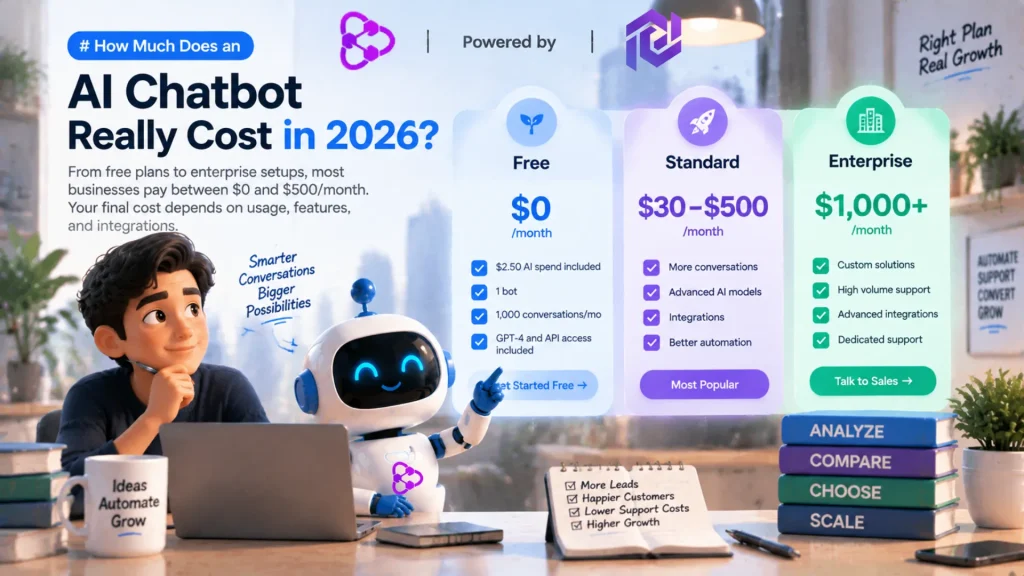
How Much Does an AI Chatbot Cost?
| Chatbot Tier | Typical Cost Range | What You Get | Best For |
|---|---|---|---|
| Free / Freemium | $0/month | Basic templates, strict message caps (50–100/mo), vendor branding on the widget | Testing an idea before you commit budget |
| Entry-Level (Starter) | $20–$100/month | Custom knowledge base, no branding, email/ticketing integrations | Solopreneurs and small teams needing an affordable AI chatbot |
| Mid-Market (Growth) | $100–$500/month | Advanced logic, multiple bots, CRM sync, human handoff, analytics | Scaling support teams and busy online stores |
| Enterprise | Custom, often $1,000+/month | Dedicated infrastructure, custom fine-tuning, SLAs, SOC2/HIPAA compliance | Large companies with strict security and compliance needs |
Pricing isn’t standardized across the industry. One platform bills by active contacts, another bills by processed messages, and a third charges per seat. Knowing which metric actually drives your bill is the difference between a predictable monthly cost and an invoice that surprises you.
What Factors Influence AI Chatbot Pricing?
Every chatbot vendor is reselling a stack of technology underneath: server hosting, access to a language model, a database for searching your documents, and the integration code connecting it all to your site or CRM. A few pieces of that stack move the price more than others.
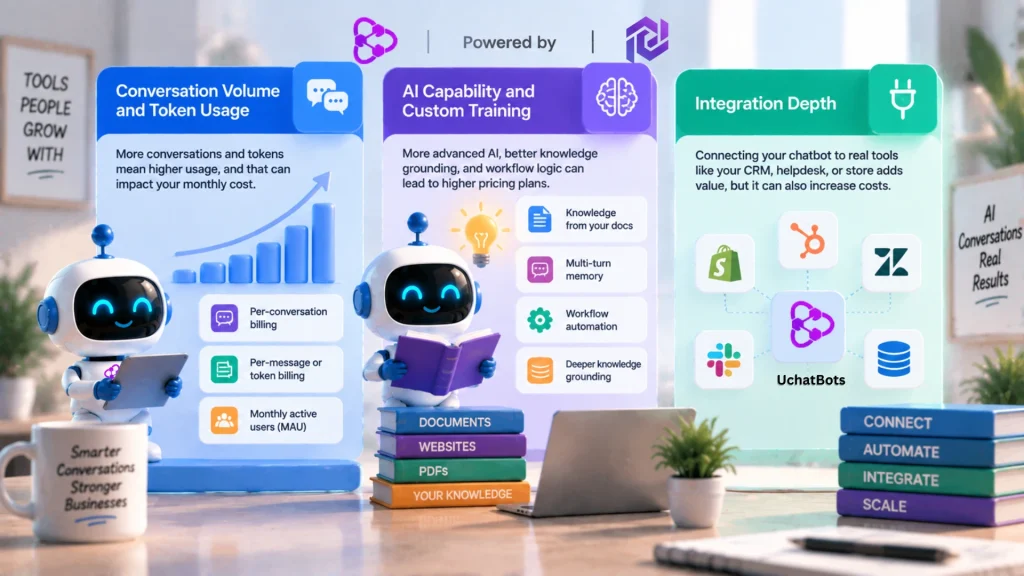
Conversation Volume and Token Usage
Older rule-based bots matched keywords and barely changed cost no matter how many people used them. Generative bots process real text for every reply, so usage matters far more now. Vendors typically bill one of three ways:
- Per-conversation billing — charged when a thread starts, regardless of length.
- Per-message or token billing — charged for the exact volume exchanged.
- Monthly active users (MAU) — tiers unlock based on unique visitors in a 30-day window.
If your traffic spikes around a sale or a holiday, usage-based billing can swing your invoice hard in either direction.
Conversational AI Capability and Custom Training
A basic bot answers from a short FAQ list. A stronger one uses retrieval-augmented generation (RAG), meaning it actually reads your help docs, PDFs, or website pages and answers from them instead of guessing. Other capabilities that push a tool into a higher chatbot pricing plan include:
- Multi-turn memory that keeps context through a long conversation instead of treating each message as new.
- Deterministic workflow logic — scheduling a demo, checking an order number, or starting a refund.
- Deep knowledge grounding across multiple document formats at once.
Platforms like UChatbots are built around exactly this balance: a visual workflow builder paired with real knowledge-base ingestion, so teams get a genuinely intelligent assistant without needing to manage raw vector databases or infrastructure themselves. That combination is a big reason UChatbots keeps coming up in comparisons — it’s aiming at the gap between “cheap but dumb” and “smart but overpriced.”
Integration Depth
A chatbot that only lives in a browser tab is cheap to run but limited. Connect it to Shopify, Zendesk, HubSpot, or Slack, and the vendor now maintains live webhooks and secure data syncing on their end — and that shows up in your bill.
Adoption of this technology isn’t slowing down either. A Gartner survey published in February 2026 found that 91 percent of customer service leaders are under pressure from company leadership to roll out AI this year, with the goal shifting from pure cost-cutting toward actually improving customer satisfaction. That shift matters for pricing, because vendors are investing more in accuracy and integrations, not just raw chat volume, and that shows up in what they charge.
Beyond pricing, businesses should also consider how an AI chatbot handles customer data, privacy requirements, and security controls before deploying it at scale. Understanding chatbot security practices is especially important for companies handling sensitive customer conversations.
AI Chatbot Pricing Models Explained
Flat Monthly Subscription
- Predictable fixed cost
- Set message or seat cap
- Easiest to budget for
Consumption / Usage
- Pay for what you actually use
- Scales directly with traffic
- Risk of bill volatility
Hybrid / Overage
- Base plan covers set volume
- Overage fee per extra 1,000 msgs
- Good middle ground
- Flat monthly subscription: A fixed fee, usually $49–$199/month, for a set bundle of seats, features, and message allowance. Safest for teams that want budget certainty.
- Pure usage-based pricing: Micro-fees per interaction or token. Economical for low or unpredictable volume, but can scale fast if a prompt goes viral or traffic spikes.
- Hybrid / overage-based: A base subscription plus automatic charges (often around $15 per extra 1,000 messages) once you go past your limit.
None of these chatbot pricing plans is objectively better — the right one depends on how steady your inbound volume actually is, which is worth pulling from your last 90 days of support tickets before you commit.
Free AI Chatbots vs. Paid AI Chatbots
A free plan is a reasonable way to test whether a chatbot fits your workflow before spending anything. But commercial operations hit real ceilings fast.
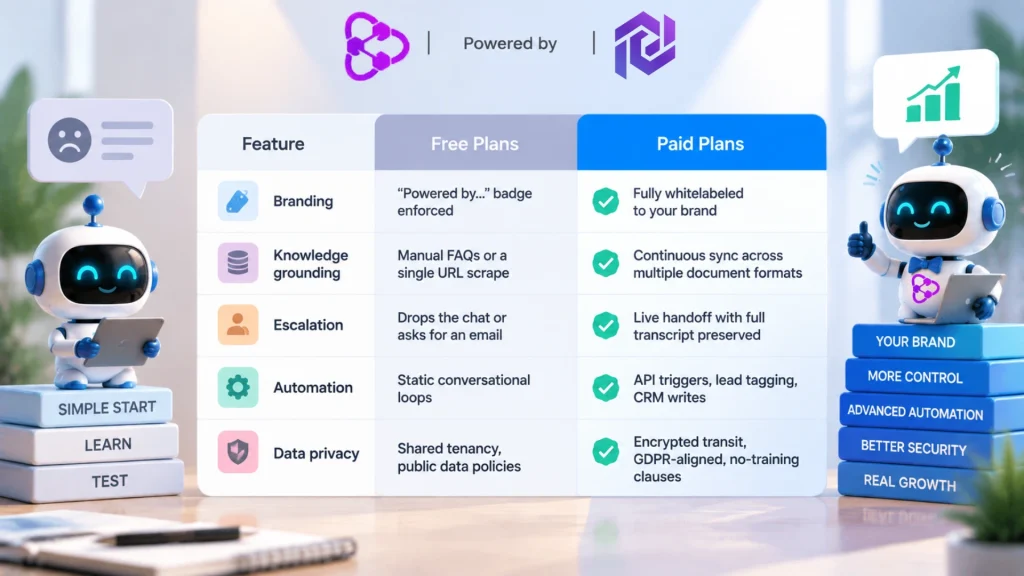
Free Plans
- Branding: “Powered by…” badge enforced
- Knowledge grounding: Manual FAQs or a single URL scrape
- Escalation: Drops the chat or asks for an email
- Automation: Static conversational loops
- Data privacy: Shared tenancy, public data policies
Paid Plans
- Branding: Fully whitelabeled to your brand
- Knowledge grounding: Continuous sync across multiple document formats
- Escalation: Live handoff with full transcript preserved
- Automation: API triggers, lead tagging, CRM writes
- Data privacy: Encrypted transit, GDPR-aligned, no-training clauses
Free tiers are solid prototyping sandboxes. The moment your assistant becomes a real customer-facing touchpoint that shapes how people see your brand, a badge-branded free tool starts working against you instead of for you.
Hidden Costs to Watch For
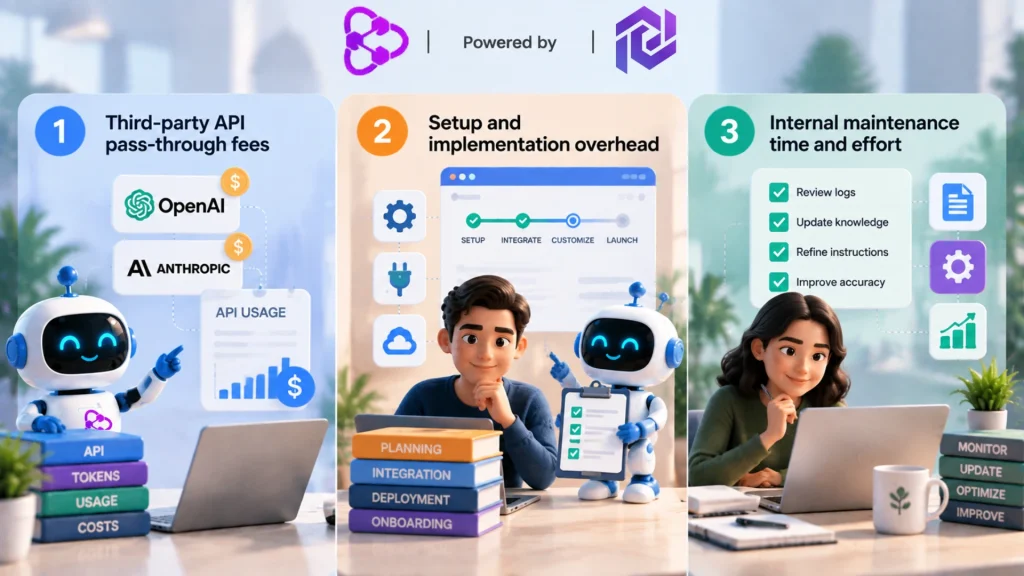
The advertised price on a chatbot’s homepage rarely tells the whole story. A few costs tend to catch buyers off guard when they’re figuring out their real AI chatbot cost:
- Third-party API pass-through fees. Some low-cost platforms only sell the interface and require your own API key from OpenAI or Anthropic. Your subscription covers the UI; token usage bills separately to your account.
- Setup and implementation overhead. No-code tools can go live in under an hour, but legacy systems or custom integrations can carry onboarding fees starting around $1,000–$5,000.
- Internal maintenance time. Every assistant needs upkeep. Budget 2–4 hours a month to review fallback logs, update knowledge documents, and refine instructions so accuracy doesn’t quietly drift.
Are AI Chatbots Under $100 Worth It?
For startups, local service providers, and niche e-commerce brands, paying several hundred dollars a month for customer service automation usually isn’t necessary.
An AI chatbot for small businesses priced between $30 and $99 a month provides real leverage when it’s scoped correctly:
- Answering 70–80% of routine questions — hours, shipping, basic troubleshooting, booking policies.
- Qualifying leads by capturing names, emails, and project scope before routing to sales.
- Covering your site 24/7 outside normal working hours.
When it works: your main bottleneck is answering the same 15–20 questions on repeat, and your monthly volume sits comfortably under 2,000–3,000 conversations.
When to upgrade: you need the bot to trigger real backend actions — processing refunds, checking live inventory, or routing tickets across departments.
If your business fits that $30-to-$99 profile, the next step isn’t whether to get a chatbot — it’s which one. We break down the best options in that price range in a separate guide.
Choosing the Right Chatbot for Your Workflow
Picking a plan isn’t about finding the “best” chatbot on paper — it’s about matching the plan to the actual bottleneck you’re trying to solve. A three-step audit gets you there faster than comparing feature lists side by side.
- Audit your inbound volume.
• Pull the last 90 days of support tickets, live chat logs, and contact form submissions.
• Calculate your real average monthly conversation count, not a best-case guess.
• Flag any seasonal spikes — holidays, sales, product launches — so a single busy month doesn’t skew your plan choice. - Prioritize your core features.
• List your non-negotiables first: Shopify or CRM integration, a custom knowledge base, email alerts on missed conversations.
• Separate those from nice-to-haves like multi-language voice synthesis or advanced sentiment tagging — features that look good on a pricing page but rarely move the needle for a small team.
• Rank each feature by how often you’d realistically use it, not by how impressive it sounds in a demo. - Map out the fallback plan.
• Decide exactly what happens the moment the bot doesn’t know an answer.
• A clean handoff to a live agent, with the full conversation history attached, keeps the customer from repeating themselves.
• An asynchronous support ticket works fine for after-hours coverage, as long as it’s tracked and someone owns the follow-up.
• Never let the fallback be a dead end — that’s the fastest way to lose a customer’s trust in the tool.
High-Volume Repetitive Qs
FAQs, hours, contact info
Starter Plan
$20–$100/moFocus: document scraping, visual builder, fast setup
Complex Workflows
Order lookups, database writes
Growth Plan
$100–$500/moFocus: webhooks, multi-tool sync, custom APIs, escalation
The UChatbots Approach to Cost-Effective Automation
This is where UChatbots earns a mention rather than a plug. Instead of locking useful features behind enterprise-only tiers or charging confusing token surcharges, it runs on a pay-as-you-use model: a flat monthly base plus a bundled AI spend allowance, so you’re not billed the same regardless of how much the underlying model actually gets used.
What UChatbots Actually Charges
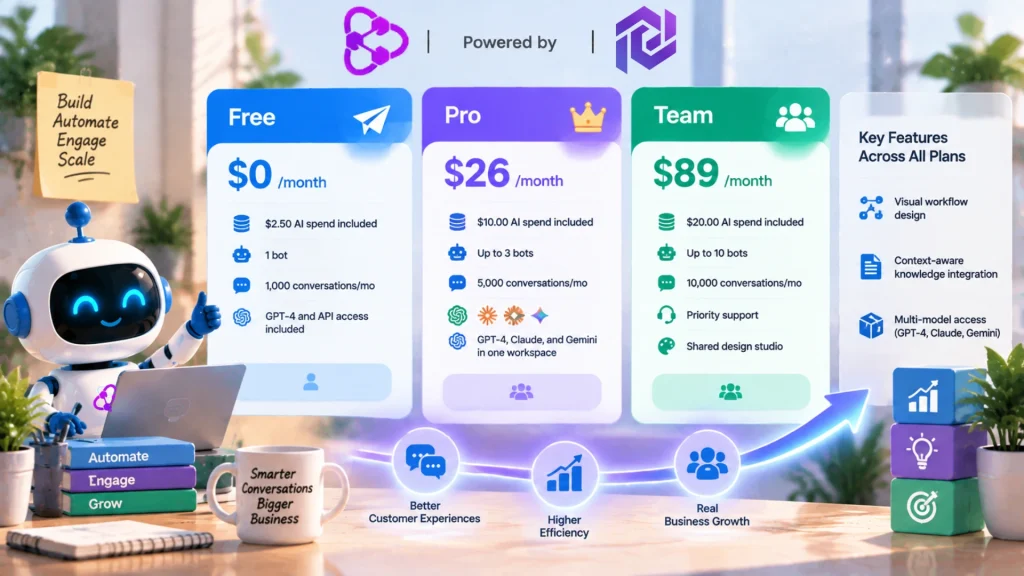
- Free — $0/month, includes $2.50 in free AI spend, 1 bot, 1,000 conversations/mo, GPT-4 and API access included.
- Pro — $26/month, includes $10.00 in free AI spend, up to 3 bots, 5,000 conversations/mo, access to GPT-4, Claude, and Gemini in one workspace.
- Team — $89/month, includes $20.00 in free AI spend, up to 10 bots, 10,000 conversations/mo, plus priority support and a shared design studio.
That bundled AI spend is the part worth noticing. Instead of a flat fee that overcharges light users and underprices heavy ones, each tier only bills past its included spend once the bots are doing real work — the same consumption logic covered earlier in this guide, just applied to a real product.
Where the Plans Actually Differ
Feature-wise, the model stays consistent across every tier rather than gating the basics behind the top plan:
- Visual workflow design — build conditional conversation flows and human handoffs without writing code.
- Context-aware knowledge integration — sync internal docs, URLs, and support content so answers are grounded rather than guessed.
- Multi-model access — switch between GPT-4, Claude, and Gemini per bot instead of being locked to one vendor.
A lot of affordable AI chatbot tools are affordable because they’re thin — one model, capped features, no real analytics. UChatbots is built to stay useful as you scale from a single bot on Free into a ten-bot Team setup, which matters if you’d rather not re-platform in a year once your volume outgrows a starter tool.
Key Takeaways: Evaluating AI Chatbot Pricing
Evaluating AI chatbot pricing comes down to unit economics, not brand names. A $50-a-month tool that reliably clears 200 hours of repetitive questions is worth more than a $10 tool that frustrates visitors with wrong answers.
If you’re still testing whether a chatbot fits your workflow, start with a free sandbox rather than committing to a paid tier upfront. Once you’re seeing clear ROI and want to scale that up, an affordable AI chatbot in the $20–$100 range with real document grounding is the right move for most small teams. And once your bot needs to trigger bidirectional actions or handle deeper routing across departments, that’s the signal to plan for $100–$500 chatbot pricing plans instead of trying to stretch a starter tier past what it’s built for.
Audit your traffic, get clear on what you actually need the bot to do, and let those numbers — not the sales page — pick your plan.
Frequently Asked Questions
How much does an AI chatbot cost?
Most businesses pay between $0 and $500 a month. Free plans work for testing, small business plans generally run $20 to $100 a month, and growth plans with deeper integrations run $100 to $500 a month. Enterprise setups with custom security needs are quoted individually and often exceed $1,000 a month.
What's the average AI chatbot pricing for a small business?
Most small businesses land between $30 and $100 a month. That typically covers a branded widget, a synced knowledge base built from your FAQs or website, basic lead capture, and enough message volume for normal traffic.
Are free AI chatbots actually worth using?
They’re fine for testing an idea, but most aren’t built for a real customer-facing role. Message caps, forced branding, and thin integrations tend to show their limits fast once real traffic shows up.
What pushes chatbot subscription cost up the most?
Conversation volume, how well the bot understands and retrieves your own documentation, how many systems it connects to, and whether you need guaranteed uptime or compliance support.
Can a small business realistically afford a good AI chatbot?
Yes. An AI chatbot for small business like Uchatbots usually cost around $100 a month. No-code platforms have brought this down for most small teams, with no developer or agency required to get a working assistant live.
Do AI chatbots replace human customer support?
No. They handle high-volume, repetitive task like frequently asked questions and basic support for instant interaction and then pass on the chat to human assistance to handle the complex tasks.
What features should I actually look for before paying for a chatbot?
Accurate document retrieval (RAG), simple knowledge base ingestion, a visual workflow builder, reliable human handoff, integrations with the tools you already use, and pricing that’s transparent about what triggers overage charges.