
How to Integrate a Chatbot With Your Website: A Practical 2026 Guide
Adding an AI chatbot to your website no longer requires a custom development project or a dedicated technical team. Modern chatbot platforms can connect with your existing website, use your business information to answer questions, and give visitors a direct way to get help without waiting for a support agent.
The basic process is straightforward: choose a chatbot platform, connect the information it needs, configure how it should respond, add the chat widget to your website, and test it with real customer questions before making it available to everyone. The complexity depends on what you want the chatbot to do. A simple support assistant can often be deployed without code, while advanced workflows may require integrations or API access.
Good chatbot integration with website is about more than placing a chat bubble in the corner of a page. The chatbot needs accurate knowledge, clear boundaries, useful workflows, and a reliable way to hand conversations to a human when automation reaches its limits.
This guide walks through the process step by step, including no-code and API-based approaches, website chat widgets, chatbot automation, testing, and the key decisions to make before putting an AI assistant in front of your customers.
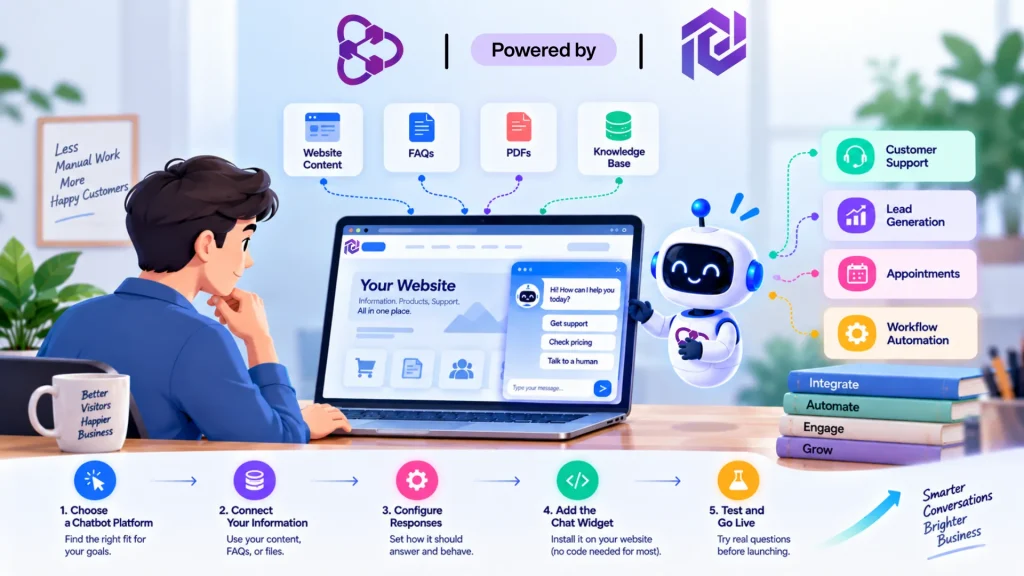
What Do You Need Before Adding a Website Chatbot?
A smooth chatbot setup starts before you place a chat widget on your website. The platform you choose matters, but so does the information, purpose, and escalation process behind it. A chatbot with a polished interface can still create a poor customer experience if it has outdated information or no clear way to handle questions it cannot answer.
Before starting your chatbot integration with website, prepare these five things:
1. A Clear Purpose
Decide what you actually want the chatbot to handle. Customer support, lead qualification, appointment requests, product questions, and basic troubleshooting all require slightly different workflows.
Starting with one or two specific jobs also makes it easier to measure whether the chatbot is helping.
2. Reliable Business Information
Your chatbot needs accurate information to work from. Gather the content customers already use, such as:
- Frequently asked questions
- Product or service information
- Pricing details
- Shipping and return policies
- Business hours
- Help documentation
- Relevant website pages and PDFs
This information becomes the foundation for the chatbot’s knowledge base. Keeping it current is just as important as connecting it in the first place.
3. A Suitable Integration Method
Not every website requires the same setup. A no-code platform may provide a ready-made widget that can be added with a simple installation step. At the same time, businesses with custom systems may need API access or other integrations.
For a standard business website, a hosted chatbot widget is often enough. More advanced requirements, such as sending customer information to a CRM or triggering actions in another application, may justify deeper chatbot API integration.
4. A Human Escalation Path
Decide what should happen when the chatbot cannot provide a reliable answer. Depending on your business, that could mean transferring the conversation to a support agent, collecting an email address, directing the visitor to a contact form, or clearly explaining where they can get further help.
This prevents the chatbot from trying to answer questions outside its knowledge to keep the conversation going.
5. A Way to Measure Results
Choose a few useful metrics before launch. You might track resolved questions, conversations transferred to agents, qualified leads, response time, or the number of questions the chatbot fails to answer.
The goal is not to maximize conversations. It is to determine whether the chatbot is actually reducing repetitive work or improving the visitor experience.
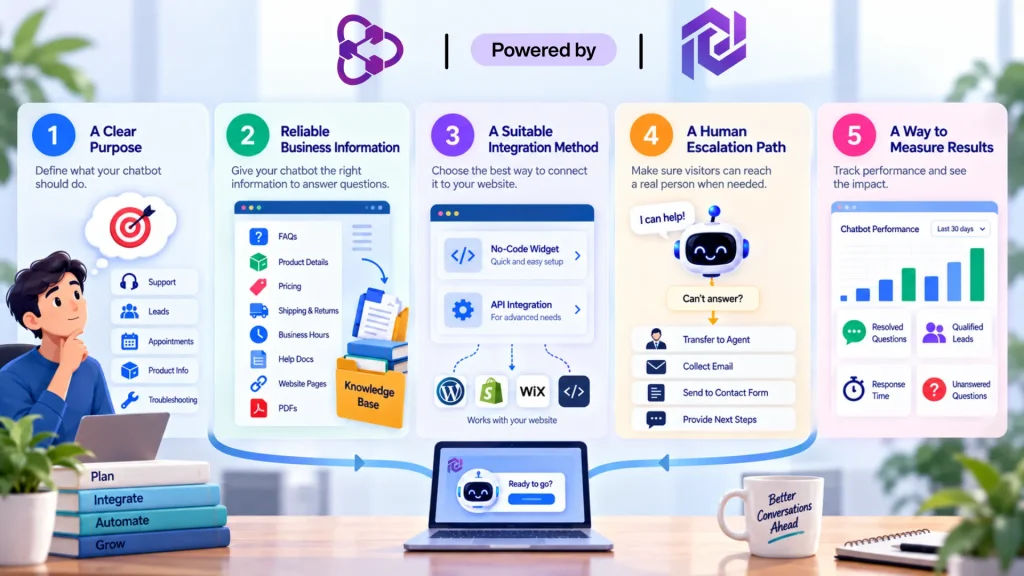
Once these pieces are ready, the technical side becomes much easier. You have a defined purpose, reliable information, an appropriate integration method, and a clear fallback when automation reaches its limits.
How to Integrate a Chatbot With Your Website
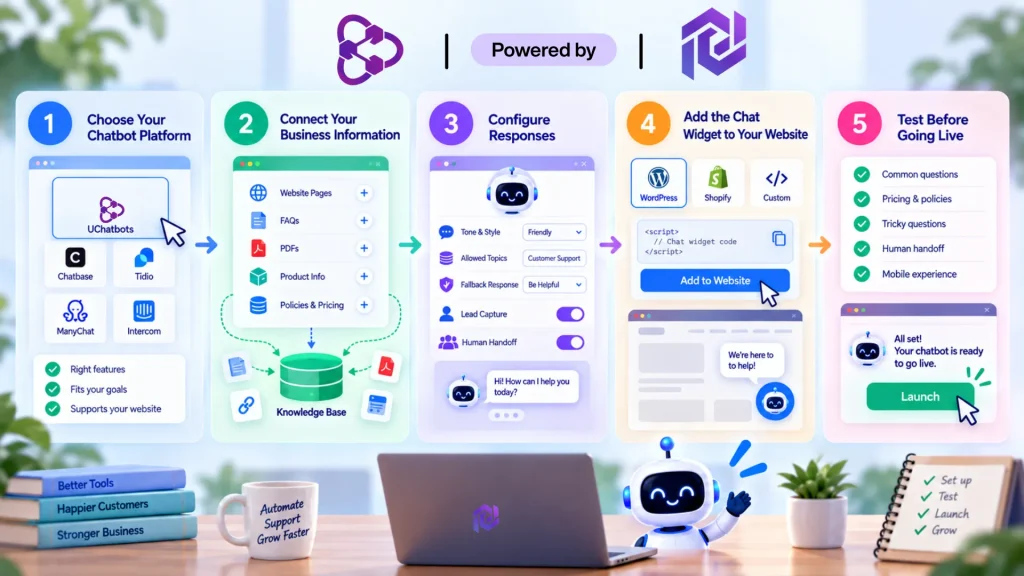
Once the purpose, knowledge sources, and escalation process are ready, the actual setup is usually much simpler than it sounds. Most modern platforms follow the same basic path: configure the chatbot, connect the information it needs, customize how it behaves, and place the chat widget where visitors can access it.
1. Choose and Configure Your Chatbot Platform
Start with a platform that matches the job you want the chatbot to perform. A basic FAQ assistant may only need website content and a simple widget, while a more advanced setup could require workflows, lead capture, CRM connections, or API access.
Before moving forward, check whether the platform supports your website technology and the integrations you actually need. Avoid paying for advanced capabilities that your business has no immediate use for.
2. Connect Your Business Information
The chatbot needs reliable information before it can provide useful answers. Depending on the platform, you may be able to connect:
- Website pages
- FAQs
- Help documentation
- PDFs
- Product information
- Policies and pricing
- Other structured business content
This is where knowledge grounding becomes important. Instead of expecting the AI to answer from general training data, give it access to information specific to your business.
If your website content changes frequently, choose a system that makes updating or resyncing that information straightforward.
3. Configure How the Chatbot Responds
Set clear rules for the chatbot before visitors start using it.
Define its:
- Tone and communication style
- Main responsibilities
- Allowed topics
- Fallback responses
- Lead-capture behavior
- Human handoff process
For example, a support chatbot should not invent an answer when it cannot verify a customer’s request. It should acknowledge the limitation and provide the appropriate next step.
Good configuration makes the chatbot more predictable and reduces the chance of confident but incorrect responses.
4. Add the Chat Widget to Your Website
The chat widget is the part visitors actually see. Most no-code chatbot platforms provide an installation method that involves adding a small script, plugin, or integration to your website.
For a typical WordPress website, this can often be done without modifying the site’s underlying code. Other platforms may provide their own integration settings or app marketplace.
Think about placement as well. The widget should be easy to notice without covering important buttons, navigation elements, or content—especially on mobile devices.
5. Test the Experience Before Going Live
Don’t judge the chatbot by asking only the questions you already know it can answer. Test the situations that are most likely to expose problems.
Try:
- Common customer questions
- Questions with incomplete information
- Pricing or policy questions
- Requests outside its knowledge
- Attempts to reach a human
- Mobile conversations
- Questions containing spelling mistakes or unusual wording
Pay particular attention to what happens when the chatbot doesn’t know the answer. A useful system should have a safe fallback rather than making something up.
Once the chatbot consistently provides accurate answers and handles difficult conversations appropriately, you can make it available to your visitors.
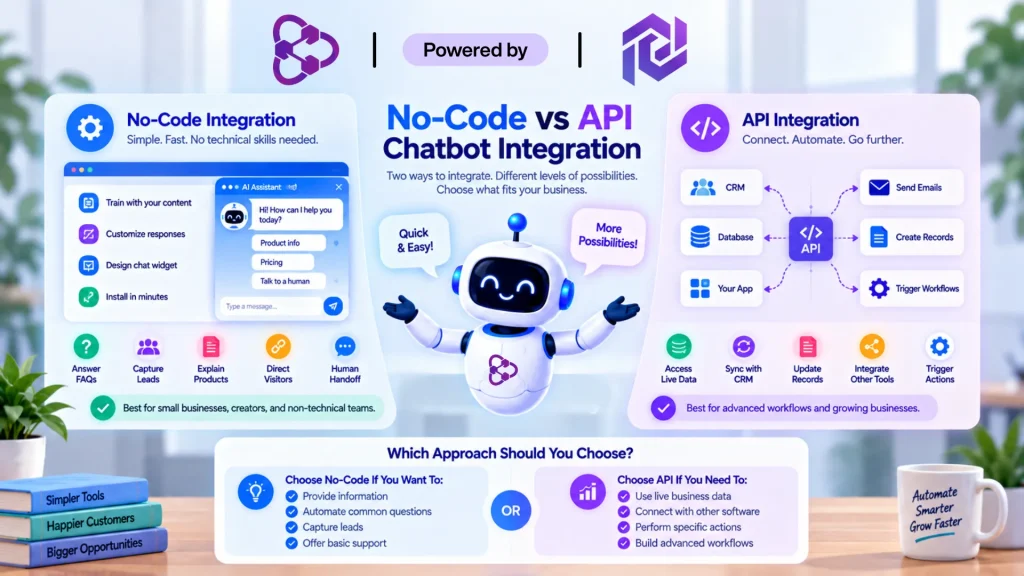
No-Code vs API Chatbot Integration
Not every business needs a technical integration to put an AI chatbot to work. For many websites, a no-code platform with a ready-made widget is enough to answer questions, collect leads, and route visitors to a human. API integration becomes more useful when the chatbot needs to exchange information with other systems or trigger actions beyond a standard conversation.
No-Code Integration
A no-code setup is usually the better starting point for small businesses and teams without dedicated developers. The chatbot platform handles the technical infrastructure while you configure its knowledge, behavior, and workflows through a visual interface.
It can work well for tasks such as:
- Answering frequently asked questions
- Explaining products or services
- Collecting contact information
- Qualifying basic leads
- Directing visitors to the right page
- Starting a human handoff
The main advantage is speed. You can make changes to the chatbot without waiting for a developer to modify the website or rebuild a custom system.
API Integration
An API-based setup gives the chatbot access to systems and actions that a standard widget cannot handle on its own. Instead of only responding with information, the chatbot can exchange data with another application or trigger a specific workflow.
For example, an integrated chatbot could potentially:
- Retrieve information from a business system
- Send captured leads to a CRM
- Create or update records
- Trigger an external workflow
- Connect with internal applications
- Pass conversation data to another service
This is where chatbot API integration becomes valuable. The chatbot becomes part of a larger business workflow rather than remaining a standalone support tool.
Which Approach Should You Choose?
Use no-code integration when your main goal is to provide information, automate repetitive conversations, capture leads, or offer basic customer support.
Consider an API integration when the chatbot needs to access live business data, communicate with other software, or perform actions based on what a visitor says.
The important distinction is not whether one approach is more advanced. It is whether your chatbot actually needs the additional complexity. Starting with a simpler integration and expanding it when a genuine business requirement appears can keep costs, maintenance, and technical overhead under control.
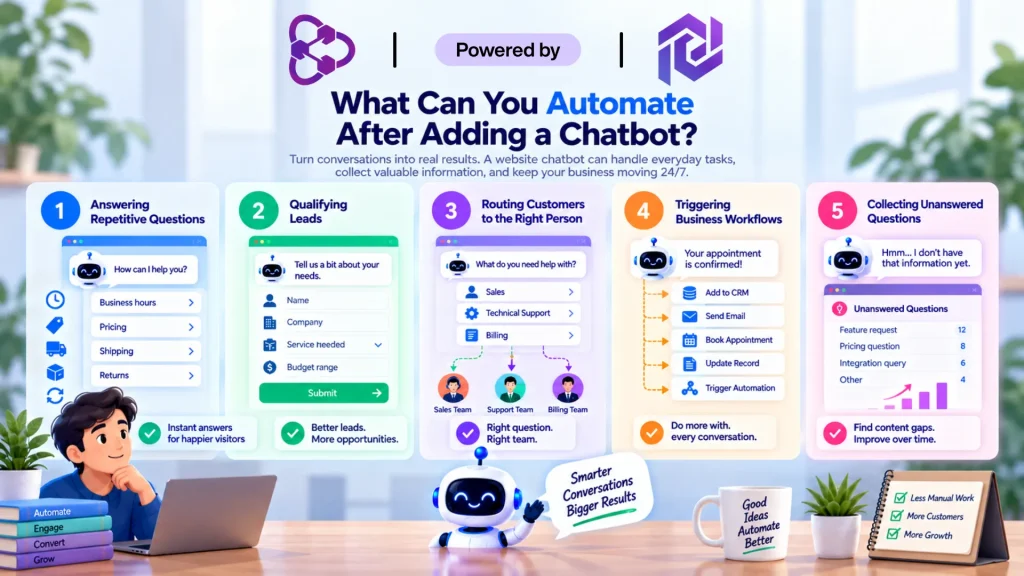
What Can You Automate After Adding a Chatbot?
Connecting a chatbot to your website is only the beginning. The real value comes from what happens after a visitor starts a conversation. With the right workflows, a website chatbot can handle repetitive tasks, collect useful information, and move customers toward the next step without requiring someone on your team to respond manually every time.
1. Answering Repetitive Questions
The simplest form of chatbot automation is handling questions your team answers repeatedly.
For example, a chatbot can provide information about:
- Business hours
- Pricing
- Products and services
- Shipping
- Returns
- Availability
- Basic troubleshooting
This gives visitors immediate answers while reducing the number of routine requests reaching your support team.
2. Qualifying Leads
A chatbot can also ask visitors a few targeted questions before sending a potential customer to your sales team.
It might collect:
- Name and contact details
- Company information
- Type of service required
- Budget range
- Project requirements
- Preferred contact time
Instead of handing sales staff a list of unqualified conversations, the chatbot can help organize prospects according to the information they provide.
3. Routing Customers to the Right Person
Not every conversation should remain automated. A chatbot can identify when a visitor needs a human and route the conversation appropriately.
For example, a technical question could go to support, while a pricing or sales request could be directed to the relevant team. Preserving the conversation context during that handoff can prevent customers from having to explain the same problem twice.
4. Triggering Business Workflows
More advanced chatbot integrations can connect conversations with other business systems.
Depending on the platform and available integrations, a chatbot may be able to trigger actions such as:
- Sending information to a CRM
- Creating a lead record
- Starting an email workflow
- Booking an appointment
- Updating customer information
- Triggering an external automation
This is where a chatbot moves beyond answering questions and becomes part of a broader business workflow.
5. Collecting Questions Your Website Cannot Answer
One of the most useful automation opportunities is learning from failed conversations.
When visitors repeatedly ask questions the chatbot cannot answer, those conversations reveal gaps in your website content, documentation, or knowledge base. Reviewing them regularly can help you update the information behind the chatbot and improve its usefulness over time.
The goal of automation is not to keep humans out of every conversation. It is to let the chatbot handle predictable work while giving your team more time for requests that actually require human judgment.
How to Test and Improve Your Website Chatbot
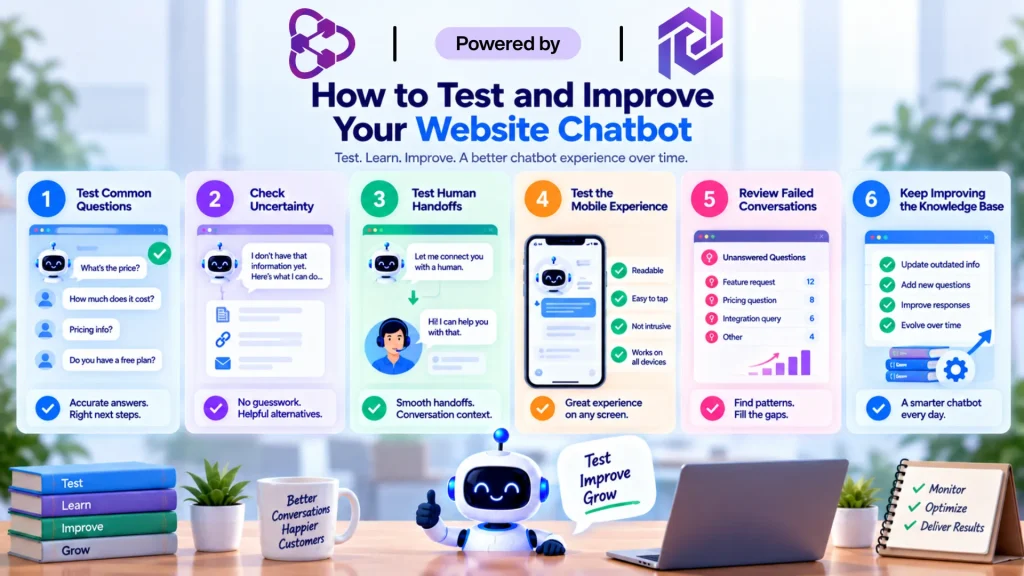
A chatbot can look ready from the administrator’s dashboard and still behave differently when real visitors start using it. Before launch, test it with the kinds of questions your customers actually ask, including questions that are incomplete, unexpected, or outside its knowledge.
- Test the questions customers ask most. Start with common support and sales questions. Check whether the chatbot gives accurate answers, understands different ways of asking the same question, and directs visitors toward the right next step.
- Check how it handles uncertainty. Ask questions that fall outside its knowledge base. A reliable chatbot should acknowledge when it does not have enough information instead of inventing an answer. Pay particular attention to pricing, policies, availability, and other information that changes frequently.
- Test human handoffs. Ask the chatbot to connect you with a person and see what happens. The handoff should be clear, and where supported, the relevant conversation history should remain available to the human agent so the customer does not have to repeat everything.
- Test the mobile experience. Open the chatbot on different screen sizes and make sure the widget does not cover important navigation, buttons, forms, or checkout elements. Messages should remain readable, controls should be easy to tap, and visitors should be able to close and reopen the widget without difficulty.
- Review failed conversations after launch. Look for unanswered questions, incorrect responses, repeated requests, and conversations that frequently require human escalation. These patterns can reveal missing information or unclear instructions that should be addressed.
- Keep improving the knowledge base. Update outdated information and add useful answers based on real customer conversations. A chatbot should evolve alongside your products, services, policies, and customers rather than remaining unchanged after its initial setup.
A successful chatbot is rarely finished on launch day. The strongest setup is one that is tested, monitored, and improved as your business and customers’ questions change.
Is UChatbots a Good Option for Website Chatbot Integration?
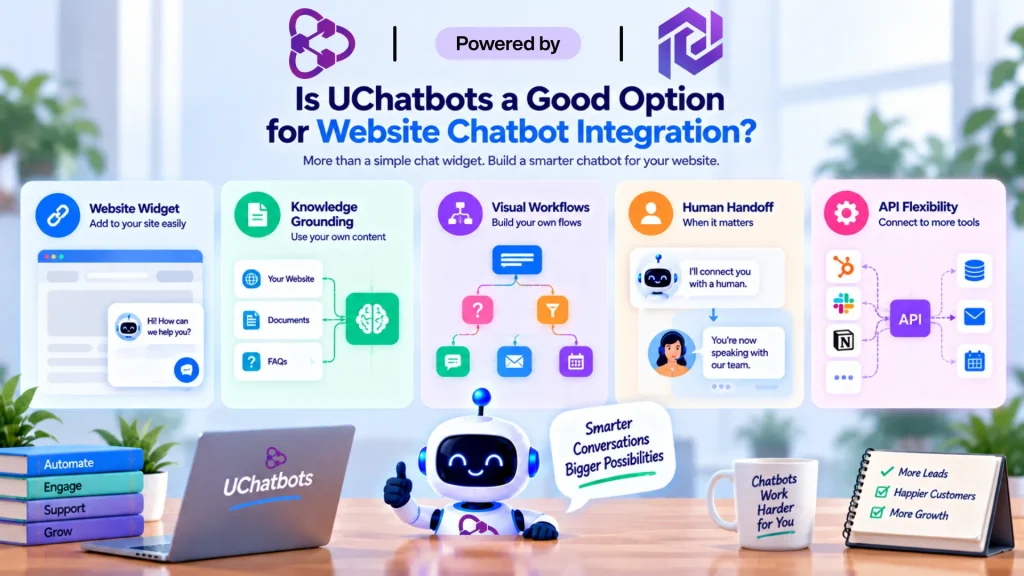
If you want more than a basic FAQ widget, UChatbots is one option worth considering. Its setup combines an embeddable website chatbot with knowledge-based responses and visual workflows, allowing businesses to build an assistant around their own content and customer needs.
A few capabilities are particularly relevant to website integration:
- Website widget: Add the chatbot directly to your site without building the interface from scratch.
- Knowledge grounding: Connect website content and business documents so responses can stay relevant to your information.
- Visual workflows: Build conversation paths for support, lead qualification, and other common tasks without creating every flow through custom code.
- Human handoff: Move conversations to a person when the chatbot reaches a question that requires human assistance.
- API flexibility: More advanced setups can connect the chatbot with external systems and business workflows.
For a small business, the main advantage is flexibility. You can start with a straightforward website assistant and expand the workflow later if your requirements become more complex.
The right choice still depends on what you need the chatbot to accomplish. If your goal is answering a handful of FAQs, a lightweight widget may be enough. If you want chatbot integration with your website to become part of your support, lead-generation, or automation workflow, a platform with knowledge and integration capabilities gives you more room to grow.
Final Thoughts
A successful website chatbot is not simply a chat bubble added to a page. It needs reliable business information, sensible workflows, clear boundaries, and a straightforward path to human support when automation is not enough.
For most businesses, the best approach is to start small. Automate the questions your team answers repeatedly, measure how visitors use the chatbot, and improve its knowledge and workflows based on real conversations.
Whether you choose a no-code widget or a deeper API-based setup, good chatbot integration with a website should ultimately make the customer experience easier while taking repetitive work away from your team.
Frequently Asked Questions
1. Can I add an AI chatbot to my website without coding?
Yes. Many modern chatbot platforms provide no-code or low-code website widgets that can be added without building a chatbot from scratch. More advanced integrations may require API or developer support.
2. How do I integrate a chatbot with my website?
The usual process is to configure the chatbot, connect your website content or knowledge base, customize its behavior, generate the chat widget, add it to your website, and test the conversations before launch.
3. How much does website chatbot integration cost?
The cost depends on the platform, conversation volume, AI usage, and integrations you need. Basic website chatbots can be available for free or at a low monthly cost, while advanced API-based implementations can cost considerably more. You can also read our dedicated article on how much does the chatbots costs in 2026 for a detailed overview.
4. Can an AI chatbot learn from my website content?
Yes. Platforms with knowledge-base or website-content ingestion can use your pages, FAQs, documents, and other approved sources to ground responses in your business information.
5. Can I integrate a chatbot with WordPress?
Yes. WordPress websites can use chatbot plugins, embedded scripts, or external chatbot platforms that provide website widgets. The simplest option depends on the chatbot provider and how much customization you need.
6. What is the difference between a chatbot widget and API integration?
A chatbot widget places the conversational interface directly on your website. API integration goes further by allowing the chatbot to exchange information with other applications or trigger actions within your business systems.
7. Can a website chatbot hand conversations to a human?
Yes. Many chatbot platforms support human handoff when the conversation requires personal assistance. A good handoff should preserve relevant conversation context so the customer does not have to explain the same issue again.