
How to Speed Up WooCommerce Checkout Page (5 Proven Ways)
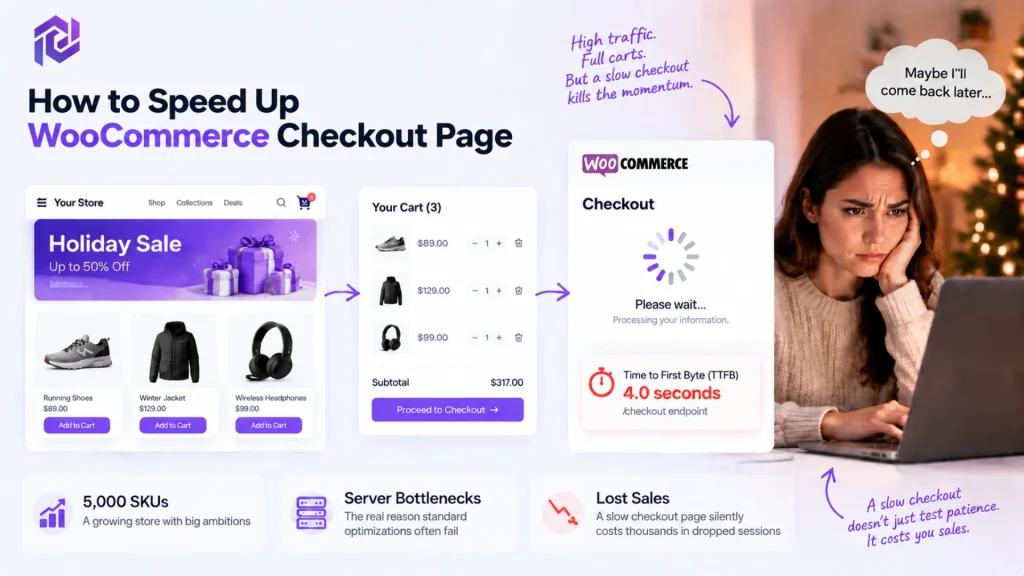
Suppose you just launched a massive holiday campaign. Traffic is pouring in, customers are adding items to their carts, but then they hit a brick wall. Every second they spend staring at a spinning wheel is a second they reconsider their purchase.
If you want to speed up woocommerce checkout page infrastructure, you must stop relying on superficial frontend band-aids. In our experience auditing stores, failure to address server-side bottlenecks is the primary reason why standard optimization efforts fail.
Let’s imagine a scenario where a store is scaling up to 5,000 SKUs. They have a beautiful design, but their woocommerce checkout loading slow issue is silently costing them thousands in dropped sessions. Their Time to First Byte (TTFB) on the /checkout endpoint is an abysmal four seconds, and no basic caching plugin is fixing it.
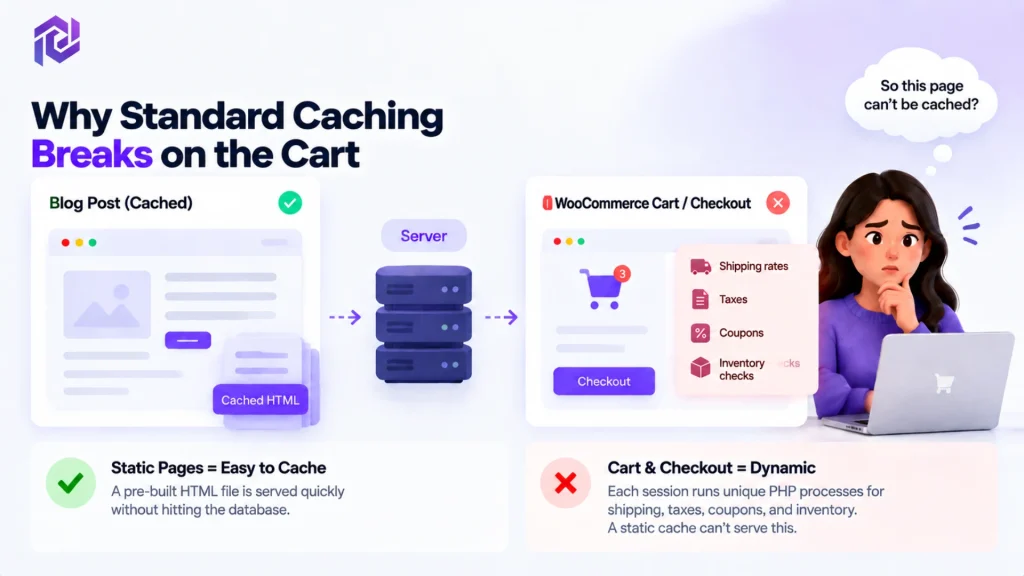
Why Standard Caching Breaks on the Cart
The fatal misunderstanding most store owners have is how dynamic ecommerce requests actually operate under the hood. Traditional page caching plugins are brilliant at generating static HTML files for blog posts and category pages. This setup works perfectly for anonymous, read-only browsing because your server hands over a pre-saved file without doing any heavy lifting.
However, the checkout page is fundamentally uncacheable. The moment a customer enters the cart, they trigger a highly personalized session. Your server must suddenly execute heavy, unique PHP calculations for conditional shipping rates, localized taxes, active coupons, and live inventory checks. Because every cart is distinct, serving a static snapshot is impossible. You must manually speed up woocommerce checkout page processes from the server side, rather than hoping a basic cache will magically bypass this intense PHP workload.
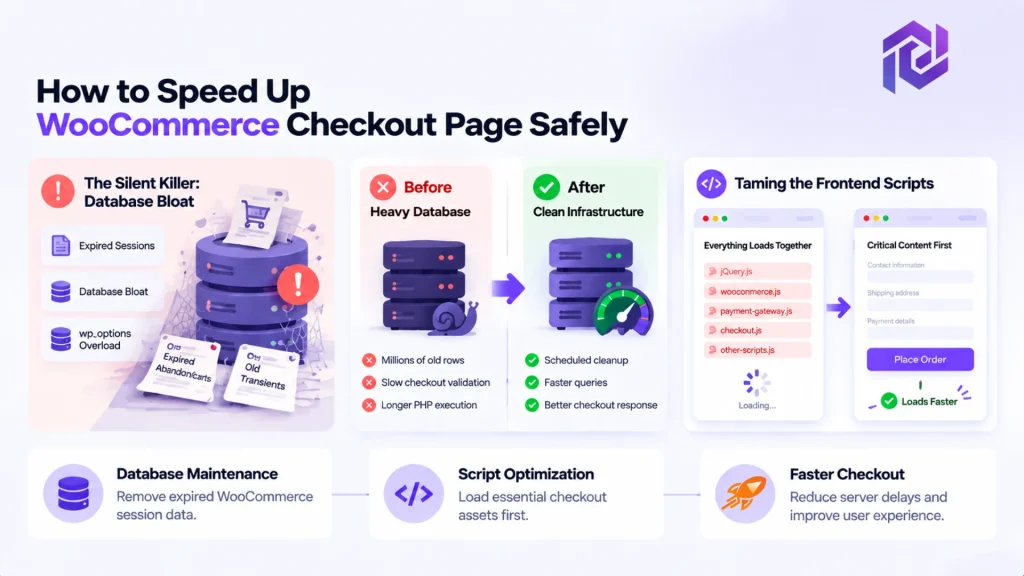
How to Speed Up WooCommerce Checkout Page Safely
To properly optimize this critical endpoint, you have to look directly at the database and the scripts firing on the front end. Every single millisecond of PHP execution counts toward your overall Core Web Vitals.
The Silent Killer: Database Bloat
Your WordPress database is likely choked with expired session data, silently acting as a bottleneck. Think of it like a physical warehouse: if your staff refuses to throw away old, cancelled order slips, eventually they won’t be able to find the new ones. Every time a user initiates an AJAX add-to-cart event, WordPress creates a session transient in the database to remember that specific cart state. Over time—especially during high-traffic bursts—thousands of abandoned carts leave behind orphaned data. If these aren’t cleared regularly, you get severe wp_options table bloat, drastically slowing down overall query execution times.
To regain snappy server response times and keep that infrastructure organized, you must routinely clean WooCommerce database transients. By definition, transients are temporary cached queries designed to speed things up. Ironically, however, WooCommerce often fails to delete them automatically when they expire. As days turn into weeks, this forces your MySQL database to scan through millions of dead rows to process a single new order from a ready-to-buy customer.
The compounding effect of this bloat is terrifying for server performance. We frequently audit stores where a simple checkout validation takes over three seconds simply because the database is exhausted from reading obsolete session data. Fixing this isn’t just about clicking a “clear cache” button once; it requires setting up automated, scheduled database maintenance so your infrastructure remains lean, agile, and ready to process real-time transactions without breaking a sweat.
Taming the Frontend Scripts
Once your database is healthy, the next major speed bump is clunky JavaScript blocking the page from appearing. To make the screen load in a snap, you must conditionally defer woocommerce checkout scripts.
By default, WooCommerce tries to load a mountain of code before the customer even sees the site, which causes that dreaded blank white screen. By telling the browser to load the visible layout first and the heavy scripts later, you allow the buyer to see the payment fields instantly.
The complex tasks happen quietly behind the scenes, keeping the shopper focused on checking out. If you truly want to speed up woocommerce checkout page performance, taking control of when and where these scripts load is a non-negotiable step.
Static Caching vs. Dynamic Processing
Let’s take a step back and look at the bigger picture. One of the biggest “aha!” moments for store owners is realizing exactly why their favorite performance plugins fail them at the finish line. There is a massive, fundamental difference between serving a static blog post and processing a live, dynamic cart.
When you rely solely on traditional caching tools, you are essentially just taking a static snapshot of your website. That works wonders for reading a homepage. But the moment a customer enters the checkout, your server has to wake up and perform real-time math—calculating shipping rates based on zip codes, applying active coupons, and pinging live inventory.
This brings up the classic debate of caching vs coding. Caching is a great band-aid that hides poor performance on static pages, but only clean, optimized coding (and raw server power) can handle the heavy lifting of dynamic checkout requests. You cannot simply cache your way out of a slow database. If you want to dive deeper into why backend architecture matters just as much as frontend snapshots, check out our full breakdown on that topic.
Review the architectural differences below to see exactly why these two environments demand completely different optimization strategies:
| Metric | Standard Caching | Dynamic Processing |
|---|---|---|
| Execution Path | Serves a pre-built HTML snapshot | Runs PHP processes and executes database queries in real time |
| Query Load | Avoids database requests by serving cached files | Creates additional load through wp_options and postmeta queries |
| Optimization Strategy | HTML optimization, CDN delivery, and asset caching | Object caching, database cleanup, and script optimization |
Server-Side Improvements for Better Core Web Vitals
If you have meticulously cleaned your database and deferred your frontend scripts, but that agonizing checkout lag is still happening, the problem isn’t your code—it’s your server’s raw muscle. At this stage, you need to look directly at how your hosting environment handles simultaneous transactions.
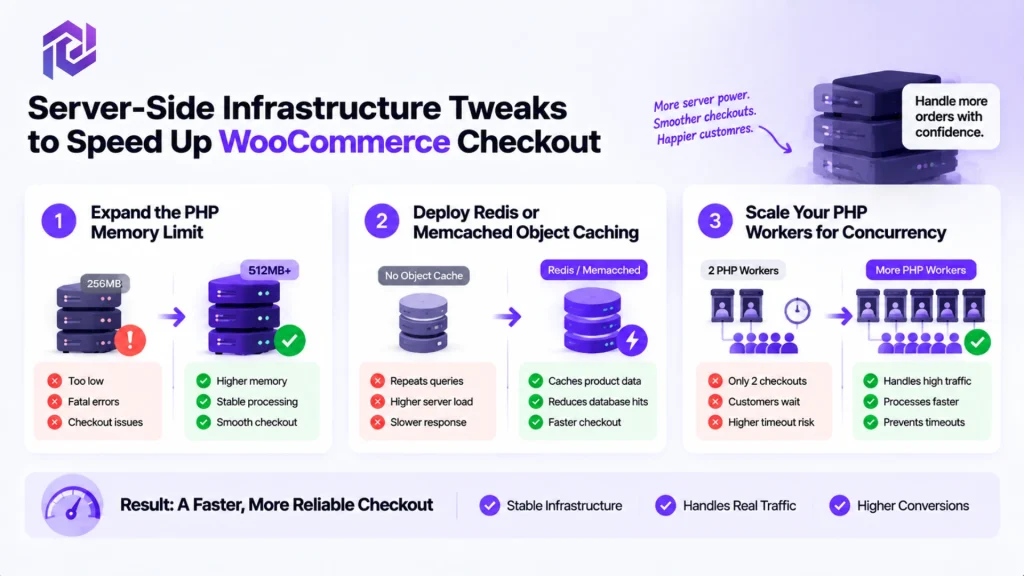
Here are the three critical server-side adjustments required to speed up woocommerce checkout page load times consistently:
- Expand the PHP Memory Limit: A restrictive memory limit is the fastest way to trigger silent fatal errors during payment processing. Every time a customer hits “Place Order,” WooCommerce pulls shipping API data, conditional tax rates, and complex cart arrays into the server’s memory. If your limit is capped at 128MB or 256MB, the server chokes under pressure. We strongly recommend adjusting your configuration to allow a minimum of 512MB (or ideally 1GB) to give those dynamic requests room to breathe.
- Deploy Redis or Memcached Object Caching: Without object caching, your server acts like a goldfish. If fifty customers have the same item in their cart, the server queries the MySQL database fifty separate times to fetch the same product metadata. Implementing Redis shifts this burden into your server’s RAM. It acts as a high-speed, short-term memory bank, drastically reducing repetitive database hits and freeing up crucial CPU cycles for the actual payment gateway handshake.
- Scale Your PHP Workers for Concurrency: Think of PHP workers as cashiers at a physical supermarket. If you launch a massive holiday sale but only have two PHP workers assigned to your server, only two customers can process their checkout at the same millisecond. The third, fourth, and fifth customers are forced to wait in a digital queue, staring at a spinning wheel until a worker frees up. Upgrading your hosting plan to ensure you have an adequate number of dedicated PHP workers is the only way to prevent concurrent checkout sessions from timing out during traffic spikes.
Can Infrastructure Fix WooCommerce Cart Abandonment?
Marketing tactics like exit-intent popups will not save a sale if the fundamental server response is broken. The psychology of trust dictates that a buyer will not hand over their credit card to a laggy portal. Let’s look at what actually moves the needle to fix woocommerce cart abandonment for good.
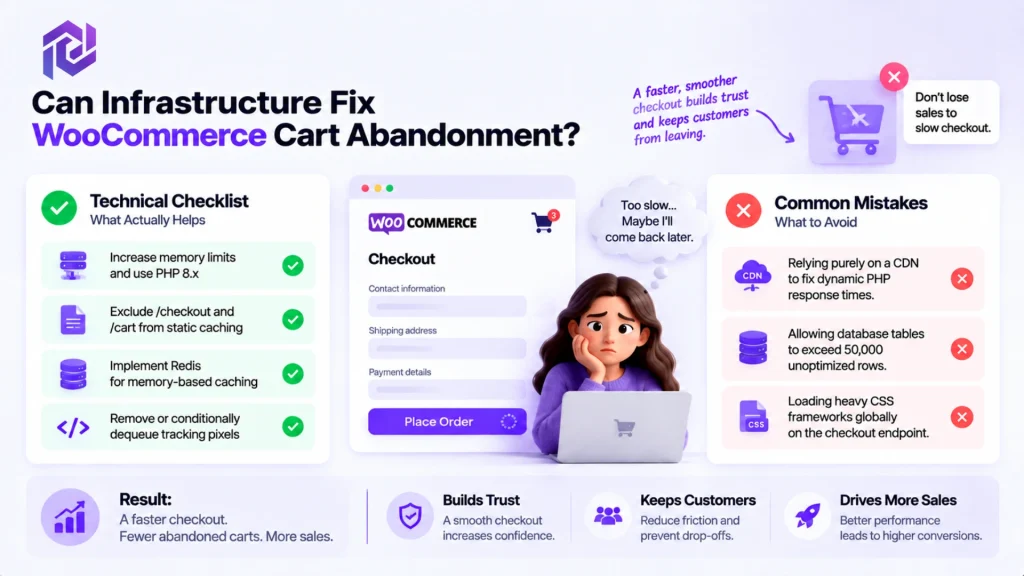
Here is our technical checklist for checkout performance:
- Increase memory limits and utilize the latest stable PHP 8.x branch.
- Exclude the /checkout and /cart endpoints from static page caching rules.
- Implement Redis for memory-based caching to bypass redundant queries.
- Remove or conditionally dequeue marketing tracking pixels from the raw checkout page.
Conversely, here are the most common infrastructure mistakes to avoid:
- Relying purely on a CDN to fix dynamic PHP response times.
- Allowing the database tables to exceed 50,000 unoptimized rows.
- Loading heavy CSS frameworks globally on the checkout endpoint.
The Automated Way to Speed Up WooCommerce Checkout Page with FastMe
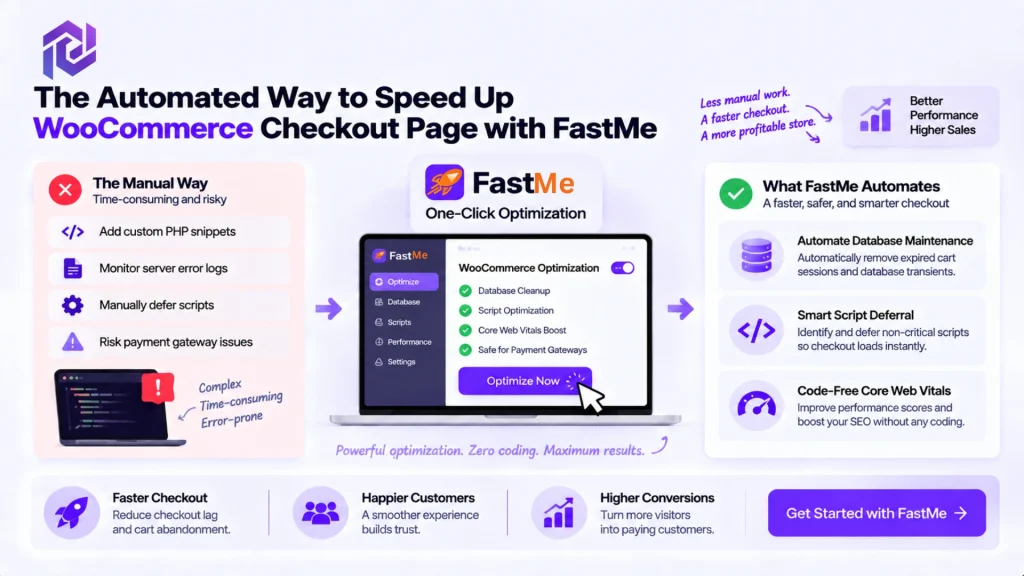
Implementing these technical fixes manually requires injecting custom PHP snippets into your functions.php file, monitoring server error logs, and risking catastrophic payment gateway failures if a script is deferred incorrectly. You are an e-commerce store owner, not a systems administrator—your time is far better spent scaling your business, driving traffic, and managing inventory.
If you want to eliminate checkout lag reliably without writing a single line of code, there is a much simpler route. FastMe one-click optimization was engineered specifically to automate this heavy backend lifting without the typical developer overhead.
Here is exactly what you can accomplish with FastMe to modernize your store’s infrastructure:
- Automate Database Maintenance: FastMe, powered by Pordix, continuously inspects your wp_options table to safely purge expired cart sessions and orphaned database transients on autopilot. Your database stays permanently lean without you ever touching a cron job or running raw SQL queries.
- Smart Script Deferral: FastMe automatically identifies bulky, non-critical JavaScript and pushes it down the loading order. FastMe knows precisely which scripts to defer so your checkout fields render immediately, without breaking sensitive payment gateways like Stripe or PayPal.
- Code-Free Core Web Vitals: You can finally achieve passing scores on Google’s strictest performance metrics. By optimizing the specific bottlenecks that traditional static caching plugins miss, you naturally elevate user experience and maximize your performance-driven SEO ROI.
Conclusion
A sluggish cart is a silent revenue killer, quietly eroding your hard-earned traffic and expensive marketing ad spend. As we have seen, standard caching plugins are completely blind to the dynamic PHP execution required during live checkout transactions. To truly speed up your checkout flow, you have to look deeper into your backend infrastructure. By clearing out bloated database transients, deferring render-blocking scripts, and ensuring your server has sufficient memory and object caching, you eliminate the invisible hurdles causing high-intent buyers to bounce.
Managing manual cron jobs and custom PHP snippets is delicate, risky, and time-consuming. You shouldn’t have to moonlight as a database administrator to keep your store fast and operational.
Stop letting technical debt drain your monthly margins and frustrate your shoppers. With FastMe, you can effortlessly clear database bloat, optimize heavy scripts, and pass your Google Core Web Vitals code-free. Take charge of your checkout speed today, build a resilient store, and watch your conversion rates rebound.
Frequently Asked Questions
Q1. Why is my WooCommerce checkout loading slow even with a lightweight theme?
A fast theme only controls how your site looks on the outside, not how your server runs behind the scenes. When a customer lands on the checkout page, your store has to do real-time math—calculating taxes, checking shipping rates, and applying coupons. If your hosting server is underpowered or your database is full of clutter, even the lightest theme in the world will freeze up.
Q2. How often should I clean WooCommerce database transients?
If you run a busy store, you should clean them every single day. Think of transients like temporary scratch paper WooCommerce uses to remember what people put in their carts. When people abandon their carts, WooCommerce often forgets to throw that scratch paper away. Over time, millions of these useless rows pile up in your database, slowing down every new order until you clear them out.
Q3. Can normal caching plugins speed up the WooCommerce checkout page?
No, and this is where most store owners get stuck. Regular caching plugins speed up your site by taking a static snapshot of a page and showing that same picture to everyone. But a checkout page is completely personal to each buyer. Because their cart, address, and totals change constantly, the page has to be built fresh from scratch every single time.
Q4. Is it safe to defer WooCommerce checkout scripts?
Yes, as long as you leave payment tools alone. You can safely delay tracking pixels, popups, and fancy animations so the checkout form shows up right away. Just make sure you never delay your actual payment gateways (like Stripe or PayPal) or core files like jQuery, or your customers won’t be able to click the “Place Order” button.
Q5. Will a faster checkout fix WooCommerce cart abandonment completely?
Speed won’t fix high shipping costs or a confusing checkout form, but it removes the biggest reason people leave: frustration. When a page takes four or five seconds to load, shoppers start second-guessing their purchase or assume your site is broken. A fast, clean checkout makes your store look trustworthy and keeps buyers moving smoothly across the finish line.