8 Best No Code Chatbot Platforms in 2026
Most vendors say you can launch an AI support bot in five minutes. They rarely mention minute six. That is when the bot invents a discount policy you never wrote, or a surprise $0.99 fee lands every time a visitor asks a simple question. The best no code chatbot platforms in 2026 are Chatbase, UChatBots, Tidio, Landbot, ManyChat, Voiceflow, Botpress and Intercom Fin. Chatbase wins on fast document Q&A. UChatBots leads on pricing clarity, multi-LLM visual flows and appointment booking.
We spent four weeks testing these tools under live customer traffic. We measured setup speed, answer accuracy, calendar booking reliability and the billing meters that quietly triple your invoice. Here is what we found.
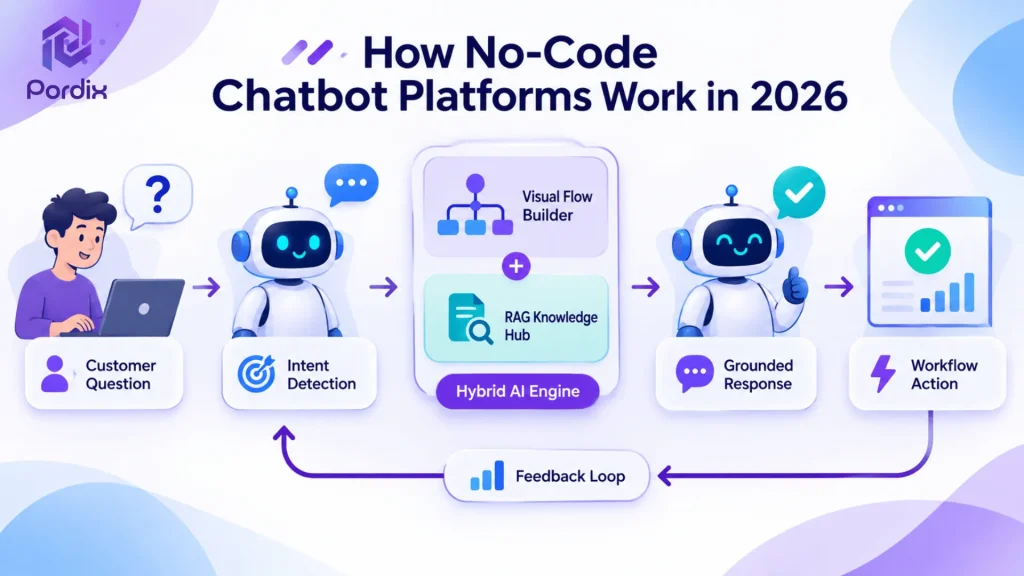
How No Code Chatbot Platforms Work in 2026
Three years ago, a no code build meant dragging rigid If/Else boxes across a screen. If a customer asked something you forgot to script, the bot replied, “Sorry, I didn’t understand that.”
Today, every good AI chatbot builder mixes two engines. The first is a visual flow builder for fixed tasks, like collecting an email, checking a budget or booking a slot. The second is Retrieval-Augmented Generation (RAG). A RAG chatbot reads your website pages, PDFs and help docs before it writes a reply, so it guesses less. According to Gartner’s customer service research, agents that pair grounded company knowledge with structured workflows are replacing old decision-tree widgets in small and mid-market teams.
Content-Trained Bots vs. Visual Flow Builders
Most tools lean one way:
- Content-trained RAG chatbots: Paste a link, upload PDFs and get a Q&A widget in under ten minutes. They handle FAQs well but struggle with a strict four-step sales script.
- Visual flow builders: Map every path on a drag-and-drop canvas with conditions, branches and loops. You control lead capture fully, but hand-building every FAQ takes weeks.
The smartest pick in 2026 is a hybrid. A canvas plus a multi-LLM knowledge hub lets your agent answer random product questions, then guide qualified buyers into a booking flow. That hybrid design is the core idea behind the modular tools at Pordix.
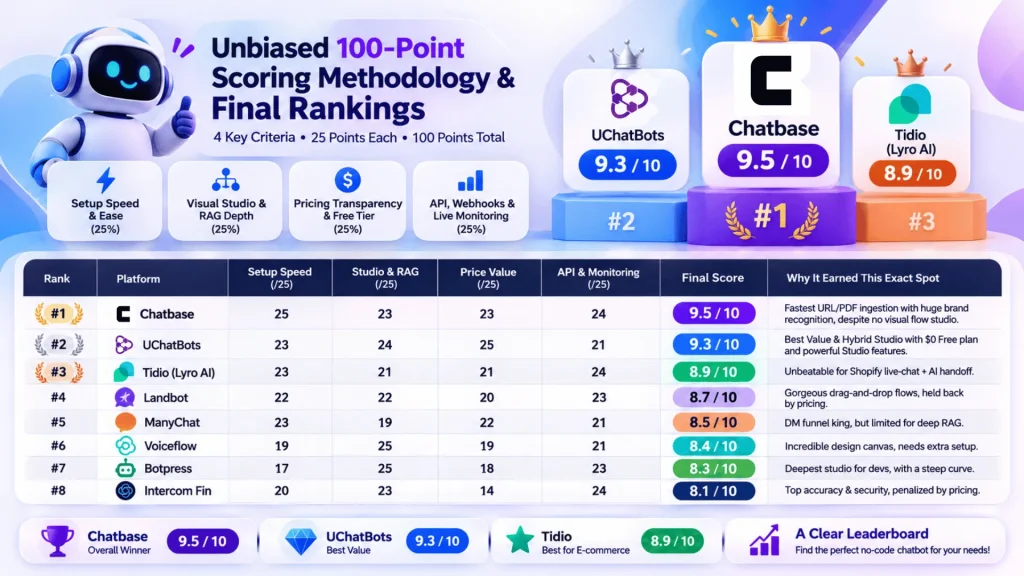
Quick Comparison: Top 8 Builders Scored Side by Side
The 8 Best No Code Chatbot Platforms, Ranked
We weighted four categories equally at 25% each: setup speed, studio and RAG depth, pricing value, and API and monitoring.
1. Chatbase (9.5/10)
Chatbase takes first place by a narrow margin. If you need to turn a 50-page help center or a folder of PDFs into an accurate RAG chatbot before lunch, nothing is faster. You paste your domain or drag in files, and Chatbase indexes them using OpenAI retrieval. Within three minutes, you can test answers in a live preview, connect Slack or Zapier, and embed the widget on WordPress or Shopify. That speed makes it a smart first test if you only need answers, not conversation paths.
The catch is that there is no drag-and-drop canvas for multi-branch conversations. The free plan gives only 100 message credits. The $40/month Hobby tier (2,000 credits) drains fast on higher-tier reasoning models.
2. UChatBots (9.3/10)
UChatBots, operated by Pordix Limited, is a close second. Chatbase wins on one-click simplicity, but UChatBots scored highest on pricing value (25/25) and hybrid design (24/25). As shown in the UChatBots documentation, its studio combines document RAG with standard visual workflows and an Autonomous AI Engine, and the built-in Emulator lets you test edge cases. A Front Desk view tracks response time and AI spend. Every plan includes the Chat API and signed webhooks that retry failed deliveries automatically.
UChatBots pricing is clear, with AI spend bundled in. Free is $0 for 1 bot and 1,000 conversations. Pro is $29/month ($26 billed yearly) for 3 bots and 5,000 conversations. Team is $99/month ($89 billed yearly) for 10 bots and 10,000 conversations. The trade-off is age. It is a newer brand, so its app marketplace is still growing.
3. Tidio Lyro AI (8.9/10)
Tidio earns third place for Shopify and WooCommerce stores that want human reps and an AI agent in one inbox. Its visual Flows builder pairs with Lyro, an AI agent that reads your shipping and return policies, answers routine shopper questions and shows product cards inside the chat. That shared inbox keeps human reps in the loop when a shopper needs more than the bot can give.
Chatbot pricing needs a close look here. The Starter plan is $29/month, but full Lyro volume needs a separate $39+ add-on. Your real starting cost is closer to $68/month.
4. Landbot (8.7/10)
Landbot suits marketing teams that like to map chats like a flowchart. You snap color-coded bricks together to build conversational landing pages, quizzes and WhatsApp lead funnels, with AI FAQ and appointment bricks. The canvas feels familiar if your team already thinks in funnels and landing pages. Web plans start at $45/month. Official WhatsApp Business automation needs $160+/month tiers.
5. ManyChat (8.5/10)
If your audience lives on Instagram, TikTok comments and Messenger, website-first tools will miss them. ManyChat dominates social DM funnels. Its flow builder sends an automatic DM when a follower comments a keyword on your post, following Meta’s WhatsApp Business Platform rules. It is less useful if most of your leads arrive through your website. The $15/month Pro plan scales with contact list size, and the AI step builder adds $29/month on top.
6. Voiceflow (8.4/10)
Voiceflow works like Figma for conversational AI. Designers and prompt engineers share one infinite canvas, with reusable component blocks, team comments and multi-model prompt chaining. That makes it great for agencies prototyping complex voice and chat experiences. It is a design tool, not a full helpdesk, so you must connect your own live chat inbox.
7. Botpress (8.3/10)
Botpress fits teams that start no-code but later need custom TypeScript validation. Its studio pairs Autonomous Nodes and knowledge tables with code cards and deep channel integrations. It is the one tool here where a developer can step in without leaving the studio. Non-technical users face a steeper learning curve than with Chatbase or UChatBots on Pordix, and the Plus plan costs $150/month billed annually.
8. Intercom Fin (8.1/10)
Fin is a strong enterprise agent for teams already on Intercom or Zendesk. It ingests help centers and ticket macros with SOC 2 security, and managers write plain-English Procedures to verify users and update accounts. Pricing holds it back: $29+ per human seat plus $0.99 per resolved outcome. Resolving 1,500 routine tickets adds $1,485 to your invoice. That model can suit large teams with steady ticket volume, but small teams should model the cost first.
Hidden Costs and Risks to Check Before You Pick
Demo videos always look easy. The presenter tests three clean FAQ pages and zero angry customers.
Hidden Cost Meters on No Code Chatbot Platforms
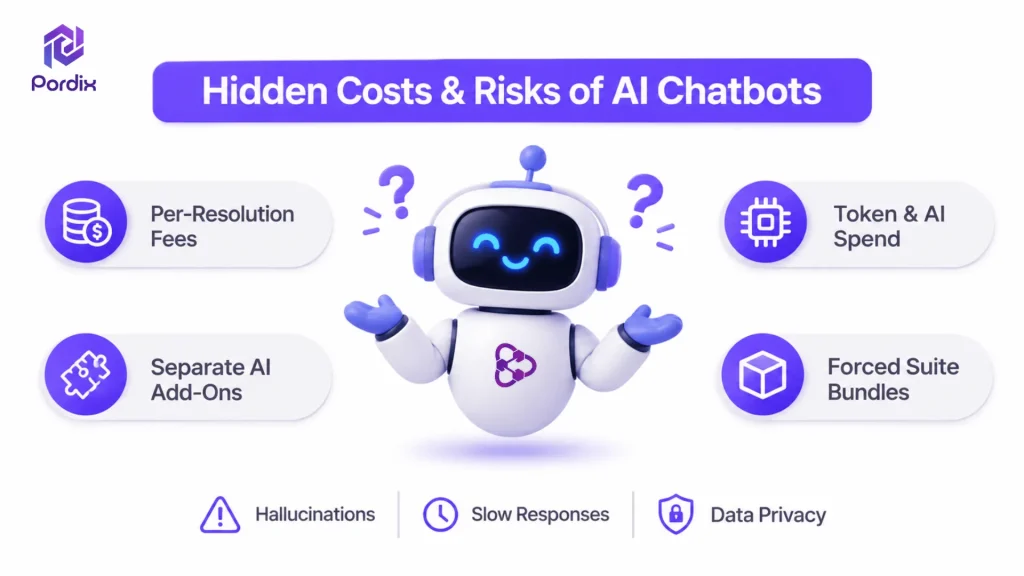
Headline chatbot pricing is built to get your card on file. Before you embed a widget on your live site, check which of these four meters controls your bill on most no-code chatbot platforms:
- Per-resolution fees ($0.99–$2.00 per outcome): Intercom and Zendesk use this model. The better your bot works, the higher your bill climbs.
- Opaque token multipliers: Many tools sell “message credits” without saying that a smarter model burns 5x to 10x more per reply. UChatBots shows live AI spend next to the included allowance ($2.50 Free, $10 Pro, $20 Team).
- Separate AI add-on fees: Check whether the $19–$29 base plan includes the AI engine or only button flows.
- Forced suite bundles: Skip vendors that push a big CRM and marketing package just to run one bot. Pordix keeps its products modular. Use AutoContent AI for WordPress blogging, FastMe for Core Web Vitals speed, or UChatBots, and pay only for the tool you use.
Hallucinations, Latency and Privacy
A bot that takes eight seconds to reply or invents fake prices destroys buyer trust. Choose an AI chatbot builder with a monitoring view that tracks average response time and messages per session, so slow models show up fast.
Align your uploads with the NIST AI Risk Management Framework. Also blur personal data in PDFs with a redaction tool like PointPDF before adding files to your bot’s vector storage.
How to Launch Your First AI Agent in Under 30 Minutes
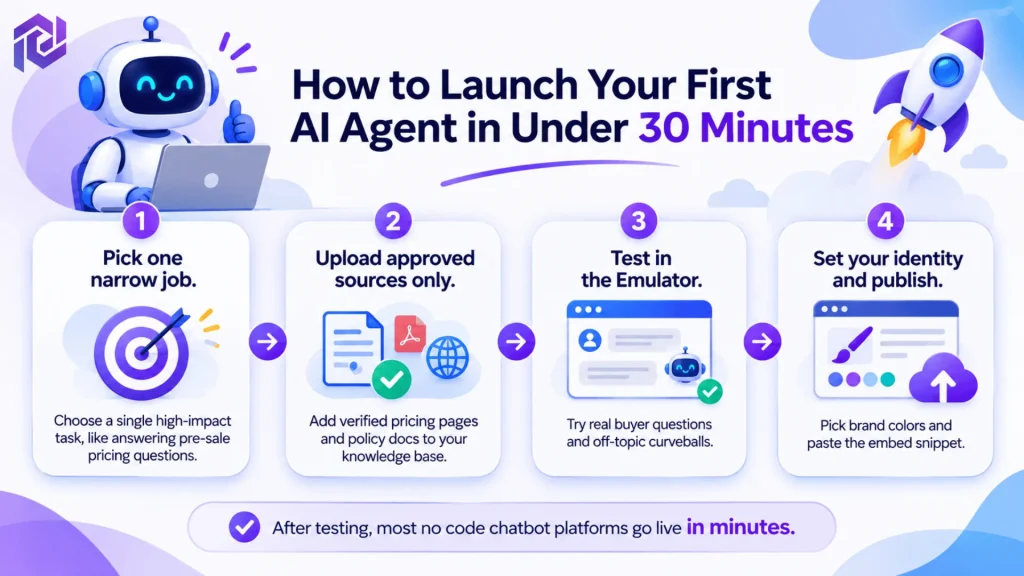
Follow this four-step flow, modeled on the UChatBots Studio process:
- Pick one narrow job. Choose a single high-impact task, like answering pre-sale pricing questions or turning storage inquiries into reserved units with a template.
- Upload approved sources only. Add verified pricing pages and policy docs to your knowledge base. Leave out outdated blog posts, because a RAG chatbot is only as good as its sources.
- Test in the Emulator. Try ten real buyer questions and five off-topic curveballs. Check that fallback rules and signed CRM webhooks fire cleanly.
- Set your identity and publish. Pick brand colors and a bot identity in Front Desk, then paste the embed snippet in your site footer. After testing, most no code chatbot platforms go live in minutes.
Conclusion
The right pick depends on your job. Choose Chatbase for fast document answers, Tidio for ecommerce live chat, ManyChat for social DMs and Botpress for developer control. If you want a visual flow builder, a RAG chatbot and clear chatbot pricing in one place, UChatBots is the hybrid to test first. Its Free plan lets you try it at no cost.
Whatever AI chatbot builder you choose, run your own ten-question test before you commit. The best no code chatbot platforms earn their price on your real traffic, not in a demo.
Frequently Asked Questions
Q1. What are no code chatbot platforms and how do they work?
They are visual workspaces for building AI support and lead-capture agents without code. They pair a visual flow builder with vector storage, so the bot reads your URLs and PDFs, answers accurately and triggers webhooks or API actions.
Q2. Which no code AI chatbot builder has the best free plan in 2026?
UChatBots offers the most generous free tier we tested: 1 bot, 1,000 monthly conversations, 100 MB file storage, 100 MB vector storage, $2.50 AI spend, Design Studio, analytics and full API access. Chatbase’s free plan gives only 100 message credits.
Q3. How much does an AI chatbot builder cost per month?
Clear chatbot pricing runs $26 to $99 per month as you scale. UChatBots Pro is $29 ($26 yearly) for 3 bots and 5,000 conversations. Team is $99 ($89 yearly) for 10 bots and 10,000 conversations. Chatbase starts at $40, and Intercom Fin charges $29+ per seat plus $0.99 per resolved ticket.
Q4. When should I use an Autonomous AI node instead of a Standard flow?
Use a Standard workflow when the order of steps must never change, such as collecting a name, email and order number. Use an Autonomous AI node, available on UChatBots and Botpress, when the agent must read context and choose the next best step itself.
Q5. Can a no-code chatbot sync transcripts to my CRM automatically?
Yes. UChatBots and Voiceflow support real-time webhooks and REST APIs. When a visitor finishes a chat or leaves a thumbs-down, an HMAC-signed webhook pushes the transcript, session ID and lead details to your CRM or Slack.