
7 Critical Metrics for Measuring AI Customer Support ROI in 2026
Most support teams can tell you their AI agent handled 10,000 tickets last month. But ask what those tickets actually saved the business, and the answer is often unclear. High ticket volume sounds impressive, yet it doesn’t prove that AI is delivering real value.
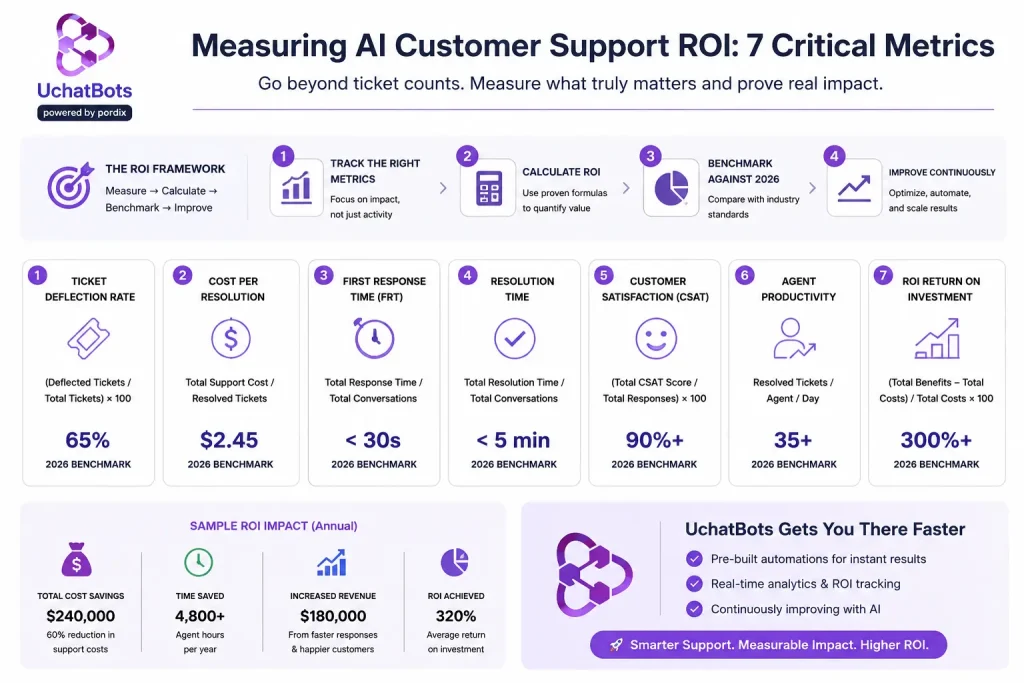
Measuring AI customer support ROI goes beyond tracking ticket counts or deflection rates. It means connecting AI performance to business outcomes like lower support costs, faster response times, higher customer satisfaction, and a quicker return on investment. These are the metrics that help leaders justify AI spending with confidence.
The challenge is that many businesses still rely on vanity metrics instead of meaningful financial results. Without a clear way to measure ROI, it’s difficult to know whether your AI support solution is truly improving performance or simply handling more conversations.
In this guide, you’ll learn the seven AI customer support metrics that matter most in 2026, along with industry benchmarks, ROI formulas, and practical tips for building a business case backed by real data rather than assumptions.
How Measuring AI Customer Support ROI Works?
AI customer support ROI measures the value your AI agent generates compared to the cost of implementing and maintaining it.
The basic formula is:
ROI = (Cost Savings + Revenue Impact − Setup Cost) ÷ Setup Cost
While cost savings are important, they don’t tell the whole story. An AI solution may reduce support expenses, but it can also increase revenue through better customer interactions and reduce business risks by minimizing errors, improving consistency, and easing agent workload.
To measure ROI accurately, consider three key factors: lower operating costs, additional revenue, and reduced risk. Looking at all three gives you a clearer picture of your AI investment’s true business value.
The 7 Critical Metrics to Track
1. Cost Per Resolution
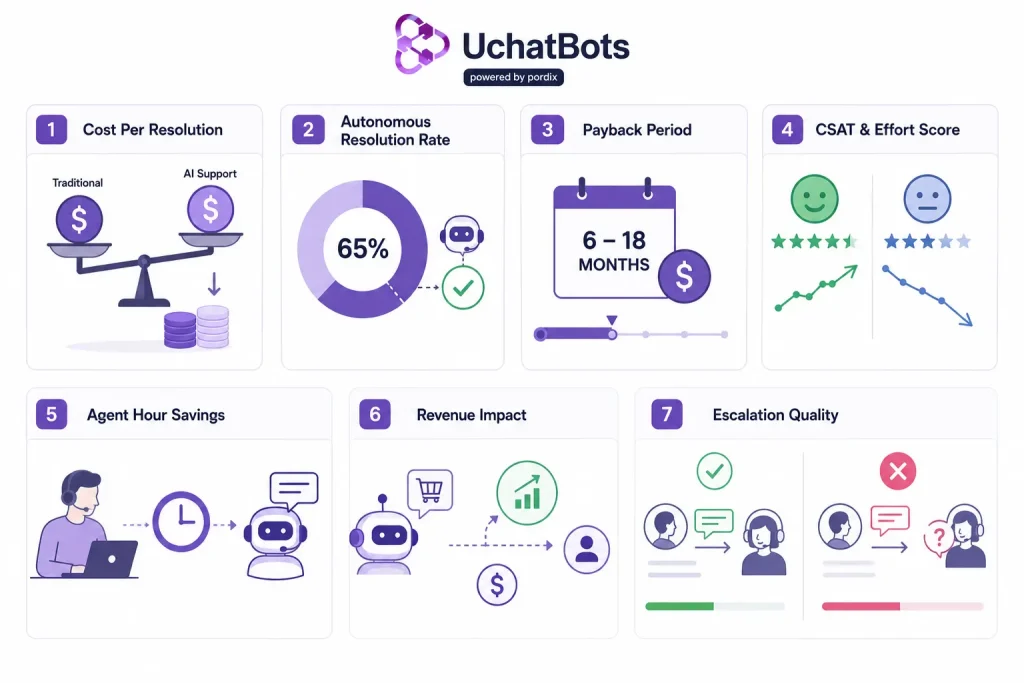
This metric compares the total cost of resolving a customer support ticket with AI versus a human agent. On average, a live agent costs between $5 and $14 to handle a single support interaction, while an AI agent can often resolve the same request for less than $1. Gartner’s own benchmarking points in the same direction, placing median agent-assisted contact costs far above self-service and AI-driven alternatives — a gap wide enough to anchor most ROI models on its own. The exact cost depends on factors such as complexity, automation level, and support volume. Since it directly measures operational efficiency, this serves as the foundation for calculating AI customer support ROI and evaluating long-term cost savings.
2. Autonomous Resolution Rate
This metric shows the percentage of support tickets your AI agent resolves without human help. While a higher resolution rate may seem better, it doesn’t always lead to better results. If AI closes tickets too aggressively, customers may return with the same issue or request human assistance later. In many cases, a consistent 60% to 70% resolution rate, combined with smooth handoffs to human agents for complex issues, delivers a better customer experience and stronger long-term ROI.
3. Payback Period
The payback period measures how long it takes for your AI investment to recover its setup costs through savings. Most businesses achieve payback within 6 to 18 months, depending on ticket volume, implementation costs, and the quality of their support data.
Organizations with higher support volumes and clean data often see faster results because AI can automate more customer interactions from day one. Tracking this metric shows when your AI solution begins generating positive ROI and helps justify future investment.
4. CSAT and Customer Effort Score
Customer satisfaction should be measured both before and after launching AI support to understand its real impact. While CSAT remains valuable, the Customer Effort Score (CES) often provides deeper insights. It measures how easy it is for customers to get their issues resolved and can reveal friction that CSAT surveys may overlook, such as repeated questions, unnecessary transfers, or confusing conversations. Tracking both metrics helps ensure AI improves the customer experience instead of simply resolving more tickets.
5. Agent Hour Savings
This metric measures the time your support team saves by using AI to handle repetitive questions and routine requests. Instead of spending hours on common inquiries, agents can focus on complex issues that require human expertise, empathy, and problem-solving. As a result, teams become more productive, response quality improves, and customers receive faster, more personalized support where it matters most.
6. Revenue Impact
AI customer support can do more than resolve issues — it can also uncover revenue opportunities. During customer conversations, AI can identify buying intent, recommend relevant products, qualify leads, and flag upsell opportunities in real time. These insights help sales and support teams act faster and increase conversion rates. Yet many businesses fail to track this revenue impact, leaving a significant part of their AI customer support ROI unmeasured.
7. Escalation Quality
A successful AI handoff should give human agents the full conversation context, so customers never have to repeat themselves. Track the repeat rate on escalated tickets to see how often users must explain their issue again after being transferred. A high repeat rate signals poor handoffs, increases customer frustration, and reduces the efficiency gains AI is meant to deliver. Keeping this metric low improves the customer experience and strengthens the overall ROI of your AI support system.
2026 Benchmarks: Payback Period by Volume
The time it takes to recover your AI investment depends largely on support volume, system complexity, and implementation readiness. Organizations with higher ticket volumes and clean support data typically see results much sooner than those working with older systems or fragmented workflows. This tracks with broader industry momentum too — Gartner’s most recent survey of service leaders found AI spending climbing sharply even as overall support budgets stayed nearly flat, a sign that ROI-focused AI investment is becoming the norm rather than the exception.
- 250,000+ support tickets per year: Typical payback in 6–9 months with routine inquiries, clean data, and straightforward integration.
- Mid-market businesses: Typical payback in 9–12 months, with moderate support volume and some implementation work.
- Complex or legacy systems: Typical payback in 12–18 months due to data cleanup, custom integrations, slower deployment, and security issues.
After deployment, the average cost per ticket often drops by 40% to 60%. Businesses handling 200,000 or more support tickets annually frequently achieve positive ROI within the first year, with savings continuing to grow as AI handles more customer interactions.
Building an AI Customer Support ROI Business Case That Gets Approved
A credible AI customer support ROI business case starts with your own numbers — ticket volume, cost per resolution, and CSAT score. Don’t lean only on vendor averages.
Build three versions: a safe case, an expected case, and a best case. If your safe case doesn’t show a return, your expected case won’t hold up either. Finance teams trust a range more than one bold number.
Two mistakes sink most business cases. First, teams only count labor savings and skip revenue and risk. This can cut your real ROI in half on paper. Second, teams underestimate Ai chatbot setup cost. Integration work often adds 20% to 30% to the price. Add in a 60- to 90-day dip while your team adjusts.
How UchatBots Delivers Measurable ROI
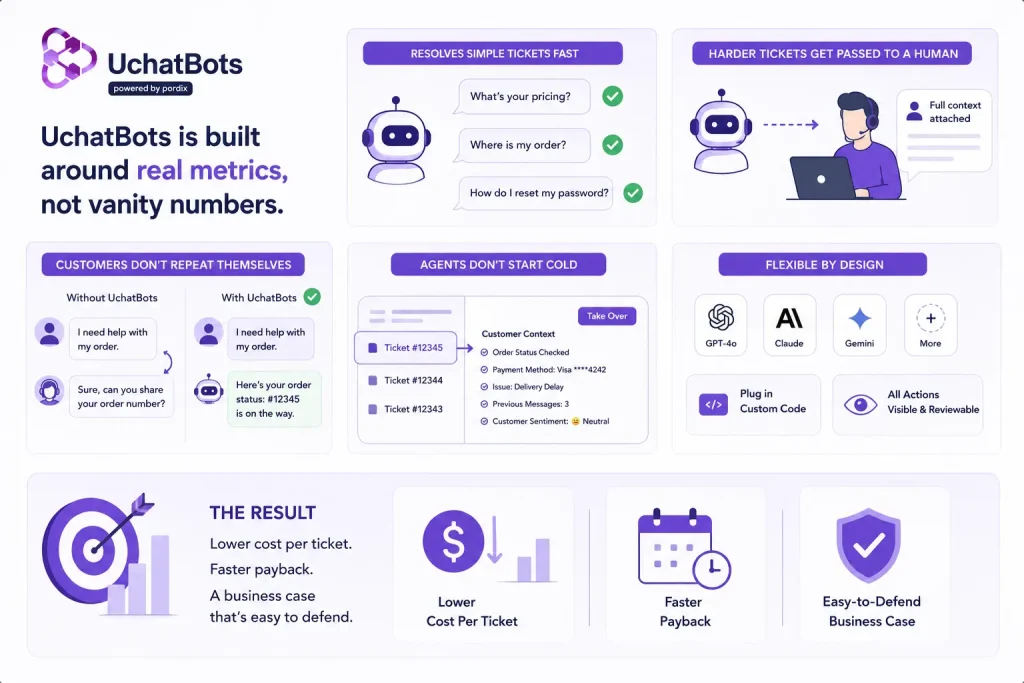
UchatBots is built around these seven metrics, not vanity numbers like “conversations handled.” It resolves simple tickets fast — pricing, order status, account basics — and hands harder tickets to a human with full context attached, so customers don’t repeat themselves and agents don’t start cold. That’s the escalation quality metric working as designed, not an afterthought.
UchatBots runs on GPT-4o, Claude, Gemini, and other top models, so your team gets flexibility without rebuilding your setup every time a new model launches. You can plug in custom code, and every action stays visible for review, which makes cost per resolution and resolution rate easy to track from day one instead of guessing at them months later.
The result: lower cost per ticket, faster payback, and an AI customer support ROI business case that’s easy to defend.
Conclusion
FAQs
Q. What metrics prove AI customer support ROI?
Cost per resolution, payback period, CSAT, agent hours saved, and revenue impact — together. Deflection rate alone doesn’t prove much. It says nothing about whether the fix actually stuck.
Q. How long until AI customer support pays for itself?
Most teams see payback in 6 to 18 months. It depends on ticket volume and how ready your knowledge base is at launch.
Q. What's a good resolution rate for an AI support agent?
A 60%–70% resolution rate with smooth human handoffs often delivers better results than a 90% rate that frustrates customers or causes repeat contacts.
Q. How does UchatBots help teams measure ROI?
Yes. UchatBots automatically tracks key AI customer support ROI metrics, including resolution rate, cost per ticket, and escalation quality. Built-in analytics eliminate the need for manual spreadsheets, giving you real-time insights into AI performance, support efficiency, and customer experience so you can measure ROI and optimize your support operations with confidence.
Q. Who owns UchatBots?
UchatBots is built and maintained by Pordix. As the parent company, Pordix focuses on creating practical AI tools that help businesses streamline operations, improve productivity, and deliver better customer experiences across multiple industries.